
 Ubuntu Desktop is a Linux distribution derived from Debian. It is one of the most popular (Desktop) Linux distributions available, and many other distributions are derived from it. Development is sponsored by Canonical.
There are two editions of Ubuntu Desktop – Ubuntu Desktop and Ubuntu Desktop Alternate Installer. The only difference lies in the installation programs. Ubuntu Desktop has a simple, graphical installer, while Ubuntu Desktop Alternate Installer has an ncurses installation program. It is suitable for use on low-resource computers.
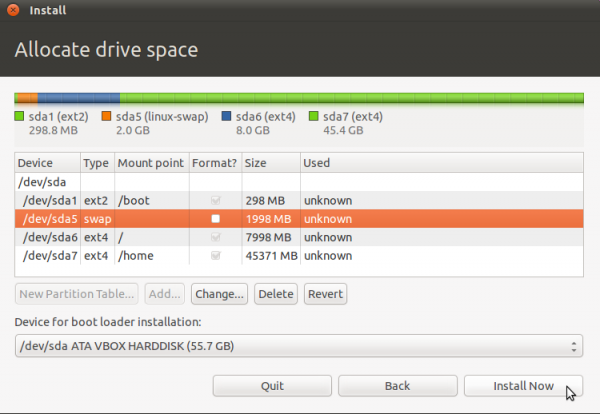
Installation Program and Installation Process: The graphical installation program of Ubuntu Desktop is very basic, and lacks support for disk encryption, LVM, the Linux Logical Volume Manager, and RAID. There is an option to encrypt the home directory, but that is the lone, physical security feature it has.
The alternate installer edition, with the ncurses interface, has support for LVM, disk encryption and RAID. It also has the option to encrypt the home directory.

Desktop Environments: Starting from the 11.04 release, Ubuntu ships with the Unity as the default desktop, with a fallback to GNOME 2 for machines that do not meet the minimum hardware requirements for running Unity.

Installed Applications and Software Management Out of the box, Ubuntu comes with most of the software that the vast majority of users would need for their daily computing needs. Those that are not pre-installed, like non-free applications and codecs, can be installed if the appropriate repository is enabled. Like on any other Linux distribution, the software repository contains thousands of free applications that you can install.
Debian’s Advanced Packaging Tool, APT, is the application management framework on Ubuntu. The most common command line utility for managing applications is apt-get, with Synaptic and Software Center as the user-friendly, graphical frontends. Both graphical applications are installed out of the box, but Synaptic offers a lot more features than the newer Software Center. The Software Center offers paid applications from Canonical’s software partners, but those are few, compared to the free applications in the default repository.

Graphical Administrative Applications: If you are running Unity, the graphical administrative applications are in the System Settings. In Fallback mode, that is, if you are running GNOME 2, they are accessible from System > Preferences and System > Administration menus.

Physical and Network Security Posture: Per physical security, Ubuntu Desktop with the graphical installer has a very bad physical security posture. For starters, the installer does not support disk encryption, and it does not provide the option to password-protect the boot loader. These are two features that are used to enhance the physical security posture of a system.
Because the Alternate Installer version of supports full disk encryption, it is possible to present a better physical security profile, and, therefore, achieve a higher security rating than if you use the graphical installer edition.
A new installation of Ubuntu 11.04 has only one open port – 631, the Internet Printing Protocol port. The firewall is not configured, and Gufw, one of 3 graphical clients for managing ufw, the command line frontend to IPTables, is not installed. AppArmor, the mandatory access control program is loaded, in enforcing mode. Ten (10) profiles are loaded by default.
Hardware Requirements and Resources: Ubuntu is supported on both 32-bit and 64-bit Intel-compatible platforms. To run the Unity desktop, a computer with 3D-accelerated graphics is required. Recommended minimum memory requirement is 512 MB. However, 1 GB or more, will make your computing life a little bit less stressful. The minimum disk space required to install the latest edition is 4.4 GB.
Download links for the latest stable editions of Ubuntu are available here. Official documentation and other support links are available here and at Questions and Answers.
Recent Reviews and Tutorials: The most recent reviews and tutorials on Ubuntu Desktop published on this website are listed below. You may peruse the full list of reviews and tutorials here:
[catlist name=ubuntu numberposts=10 excerpt=yes]
Screenshots: More screenshots from the latest edition of Ubuntu Desktop.
Installed and available Educational applications on Ubuntu 11.04.

Installed and available games.

Installed and available Internet applications.

Installed and available multimedia applications.