
Browsers and browser plugins: Epiphany and Ice Weasel, a re-branded Mozilla Firefox browser, are the two Web browsers you will find on a default installation of Debian 5. Although shockwave flash plugin is installed, both browsers do not render flash content very well. Overall, both browsers perform badly when it comes to rendering multimedia content. You will need to search for and install browser plugins yourself if you want to enjoy using any of the browsers installed..
Firewall and Network Manager: The Linux kernel has an enterprise-grade firewall application built in, but not all Linux distros ship with a graphical firewall client to configure and manage it. Debian 5 is one of them. But as with any other type of application that you need, there are several graphical firewall clients in the Debian repo that you can install either with apt-get from the command line or via Synaptic Package Manager.
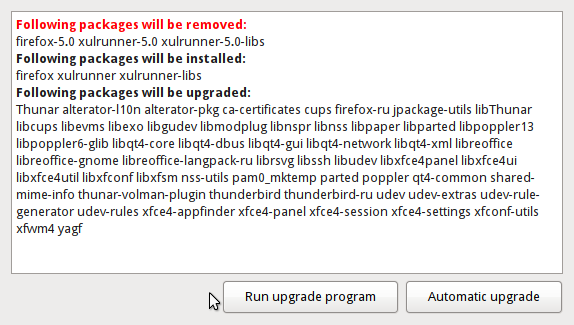
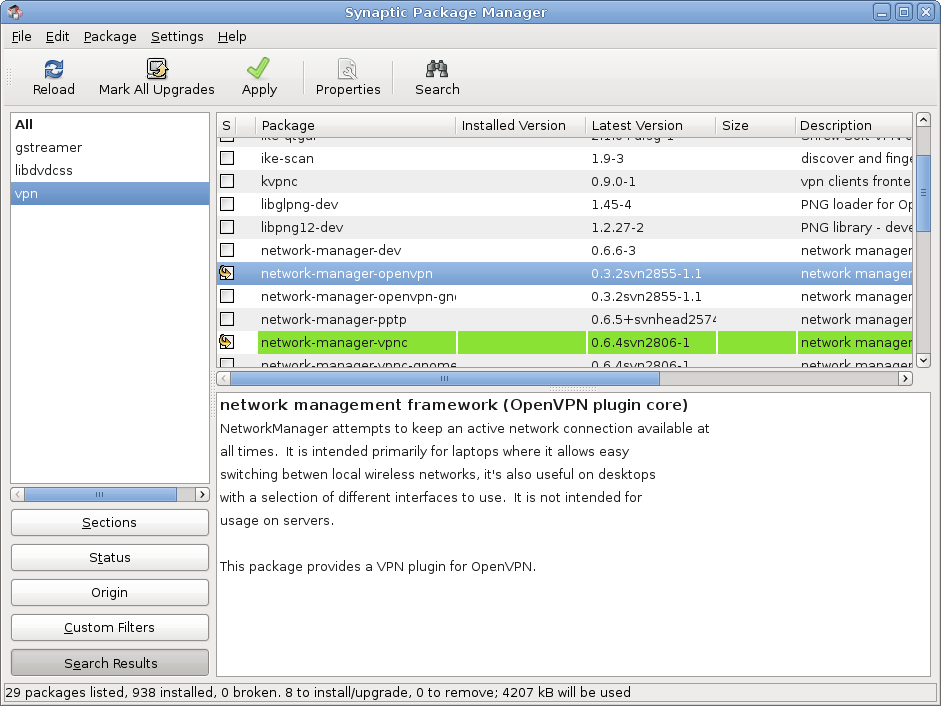
On most Linux distros, the Network Manager applet comes with the necessary plugins to set up VPN connections. Not so with the Network Manager applet on Debian. You will need to install the network-manager-openvpn plugin, if you want to use OpenVPN, and/or the network-manager-vpnc plugin, a Cisco VPN Concentrator-compatible VPN client, to be able to configure VPN connections from the Network Manager applet.
Installing Network Manager VPN plugins
For making secure network connections other than via VPN, Debian 5, as with other Debian releases, has ssh installed and configured by default (ssh, short for Secure SHell, is actually a type of VPN).
What’s Special About Debian?: Debian is well known for its rock-solid stability. If an application is in Debian’s stable repo, you can be sure that it is stable (application crashes or applications failing to launch on a default installation of Debian are rare). The one thing you have to keep in mind is that you will not get the latest, bleeding-edge applications on a default installation of Debian. You can always setup APT (by adding entries to your sources.list file) to install those bleeding-edge applications from the unstable repo (squeeze sid), or from the testing repo (squeeze). Warning! Applications installed from the unstable repo tend to be, well, unstable.
What Needs to Improve: In terms of desktop friendliness, Debian 5 is a big improvement over Debian 4. However, there is always room for more improvement. For one, we’d like to see a graphical firewall client installed by default. The client should be configured and ready to go. Of all the distros reviewed on this site, Fedora and Mandriva have the best graphical firewall clients. Debian, as one of the original Linux distros, deserves a graphical firewall client on par with that on Fedora and Mandriva.
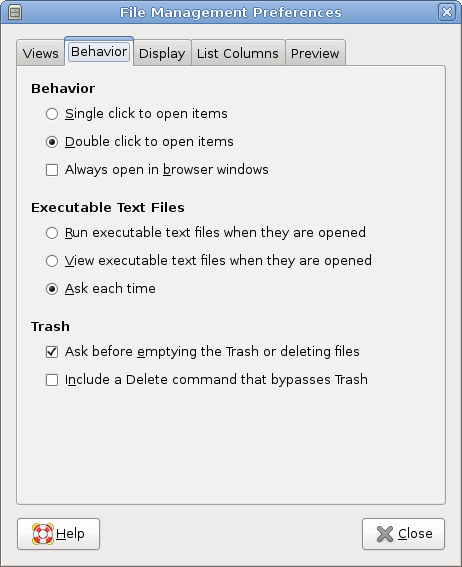
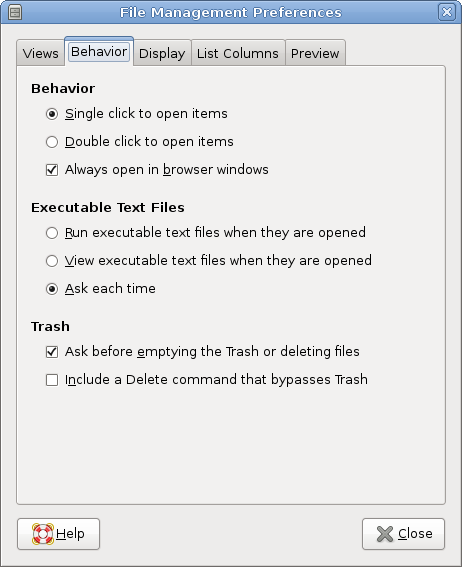
One of the most annoying aspects of using Debian is Nautilus. Nautilus is Gnome desktop’s file browser. Unless configured otherwise, clicking on a folder icon in Nautilus opens that folder in a new Nautilus window. Now, imagine clicking several folders deep. You’ll end up with as many Nautilus windows on your desktop. Distros like Parsix and Linux Mint have changed this Nautilus behavior to what actually makes sense: Click on a folder in Nautilus, and it opens in the same window. This is the way it should be. If you are new to Debian, this should not be a show-stopper. It is actually very easy to change the default Nautilus behavior. To do that, follow these simple steps (you may skip the first two steps by clicking on System > Preferences > File Management:
- bring up Nautilus (click on “my computer” or the “home” icon on your desktop
- From the menu bar, click on Edit > Preferences
- From the Preferences window, click on the Behavior tab. You should see something just like the first screenshot below.
- Click on the check box next to “Always open in browser window”. If you’d rather single click on a file or folder to open it, click on the radio button next to “Single click to open items”. Your Preferences window should now look just like the second screenshot below.
- Click Close to save and exit
Finally, Debian’s browsers should come with all the plugins needed to render multimedia and other special content (java applets, for example) on the Web. A browser is one of the most important applications on any desktop operating system, and it should be fun to use. The browsers installed on Debian 5, Ice Weasel and Epiphany, fail miserably in the fun-to-use category. A user can fix this easily, but we expect full, out-of-the-box functionality from a browser installed on a modern operating system.



I agree debian is the best linux distribution, i have mine setup to perfection i modified the grub2 and have it duel booting win 7 and lenny to choose on startup just did advanced install and a xorg gnome-core gdm, to get a nice basic system and build what i wanted on it from there, and you can have a gui firewall firestarter like i have and moblock IP blocker, if you want to learn debian is a solid choice for a OS.
I think the reviewer misses what Debian is .. A pretty advanced distribution designed for the Linux savvy…
You will never see a graphical firewall in Debian, you will never get included codecs etc – and I for one am happy for that. If ever there was any lawsuit against Linux Debian could not be brought down, et al.
Debian’s strengths like Slackware – lay in it’s ‘barebones’ philosophy it allows one to build a desktop, a server, a machine, anything you want.
If you want a ‘Desktop’ ready distribution just download Ubuntu or Mepis (I think it’s based on Debian.)
I like my Debian the way it is — what sort of install do you want? — Web Server? Yes – > Done. — Nice and simple.
“You will never see a graphical firewall in Debian,”
And what’s the reason for that?
“You will never see a graphical firewall in Debian,”
You would do if you installed Firestarter which is listed in the repository!
By the way: Ubuntu is based on a Debian testing snapshot. Testing can’t be so bad then. Sidux is based on Debian SID, but it isn’t unstable at all if you check the Sidux page before a dist-upgrade…
By the way: Ubuntu is based on a Debian testing snapshot. Testing can’t be so bad then.
Just 2 corrections:
1. “For a bootloader, GRUB (GRand Unified Bootloader) is your only option”. It’s not true. LILO and GRUB2 are also available. You can choose them using advanced install option.
2. “To install those bleeding-edge applications from the unstable repo (squeeze)”. It also isn’t true. The unstable repo is sid and is really unstable. The testing repo (squeeze) is rather stable and gets security updates in regular fashion. Many people that use Debian as desktop OS choose testing repo for their needs.
@-deadcats:
Thanks for the correction. Don’t know how I messed that up. So true, RAID means “Redundant Array of Inexpensive Disks”, and not “Random Array of Inexpensive Disks”.
Btw, I should point out to you that the “D” is for Disks, and not Discs. 😉
Um, RAID means “redundant array of inexpensive discs” at least originally. Now it’s sometimes taken to sometimes mean “redundant array of independent discs.”
But that’s OK. My wife, a life-long systems database applications developer (30 years), still refers to SQL as “sequential query language” (rather than “structured query language.”
But, hey–my 1992 Novell Networking dictionary listed over 5,000 acronyms at that time. How in the world could anyone possibly remember the multitude of acronyms in existence today? 🙂
regards,
-dc
I thought debian default installation used swfdec instead of adobe plugin…
“Finally, Debian’s browsers should come with all the plugins needed to render multimedia and other special content (java applets, for example) on the Web.”
Since that is against one of the main philosophies of the distro, that won’t happen.