

3. Install the openSSH server – On Ubuntu 9.10, the openSSH client is already installed. That allows you to initiate SSH connections to another PC in the network running an openSSH server. However, if you want your PC to accept SSH connections from another computer, you’ll need to install the server. The openSSH server is not available in the Ubuntu Software Center. To install it, you will have to use Synaptic (System > Administration > Synaptic Package Manager) or the command line.
This time, let’s try the installation from the Linux command line. Launch a shell terminal (Applications > Accessories > Terminal) and type in the following command: sudo apt-get install openssh-server.
Keep in mind that because IPTables (netfilter), the firewall application, is active and denying all remote connection requests to your PC, you’ll need to punch a hole in the firewall before SSH connections will be accepted. You can do that from the command line via ufw, the Uncomplicated FireWall, or from Gufw, its graphical interface. Gufw is not installed by default. How to install a graphical firewall client on Ubuntu 9.10 will help you with the installation.
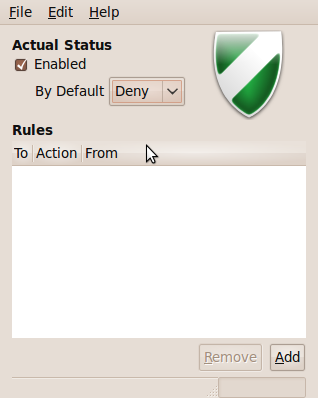
To create the SSH rule, launch Gufw from System > Administration > Firewall configuration. The interface below shows that the default policy is to deny all remote connection requests. To create a rule, click on the ‘Add’ button.
Gufw
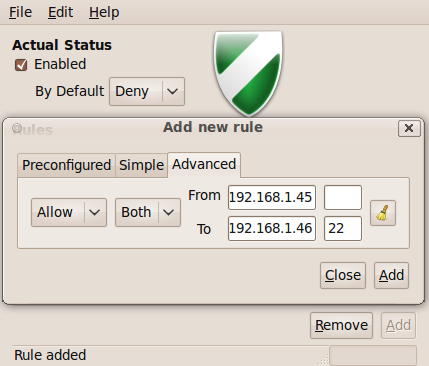
In this case, we want to create a specific rule. That rule is this: Allow SSH connections (TCP or UDP) from a specific IP address within the local network to the SSH server running on the Ubuntu PC. Note that by default, the openSSH server is listening on port 22. It is not necessary to specify a port number in the ‘from port’ field when selecting ‘Both’ (implies TCP or UDP) in the protocol selection box. The screenshot below shows how the rule was created for this test.
Because this is a very specific rule you’ll be creating it from the ‘Advanced’ tab.
Creating a rule to allow SSH connections
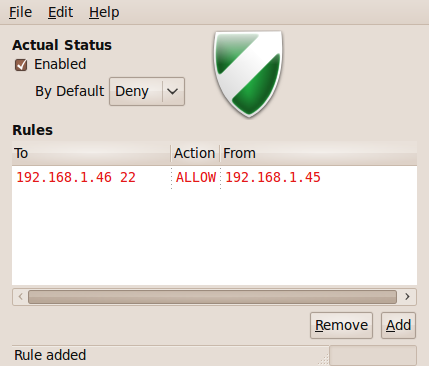
Here’s the main window of Gufw showing the newly added rule. Now you can make SSH connections to the PC from the configured remote PC.
Did you find this tutorial useful? Good. How about subscribing to the RSS feed to have more like it delivered automatically to your RSS reader.






I can easily install NTP (Network Time Protocol, a means of transmitting time signals over a computer network) using yum command under Redhat or CentOS/Fedora core Linux.