

Browsers and Browser plugins: Mozilla Firefox (version 3.5.3) and Epiphany are the two Web browsers installed by default. With Adobe Flash plugin installed, both will render flash content, and that’s just about it. To be able to render any other multimedia content, you will have to install the necessary plugins yourself.
Multimedia Playback: Rhythmbox and Totem are the default media players installed. If you insert an audio or video disc in the optical drive, you will be presented with the application with which to open it with – Rhythmbox for audio, and Totem for video. The problem with Totem, and this is true on all other distros that I have reviewed, is that it will not play encrypted DVD videos. But that does not mean that you cannot play encrypted DVD on ALT Linux. Installing VLC, which is available in the repo, will solve that minor problem.
Hardware Detection: Virtually all external hardware connected to an ALT Linux system will be auto detected. USB storage drives are automatically opened in Nautilus, the file browser for the GNOME desktop environment. Printers are also auto-detected, but not automatically configured. Using a printer on ALT Linux requires that you manually install it yourself. While manual installation of a printer is an easy process, the better designed distros like Pardus eliminate this process by automatically configuring any printer that is connected to the system.
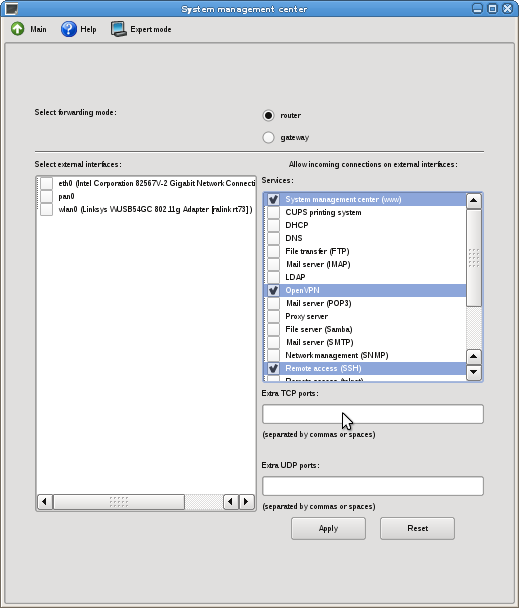
Security Posture and Network Manager: IPTables/Netfilter is not enabled by default on ALT Linux 5 Ark desktop. Setting it up is an easy process via a graphical utility in the System Management Center. OpenSSH, server and client are installed, and the server is enabled out of the box. OpenVPN, PPTP client, and Cisco VPN client, vpnc, are all installed.
The network manager application is NetworkManager. NeworkManager plugins for openVPN, PPTP and vpnc, are installed, thus making it possible to setup VPN connections from the NetworkManager’s applet interface.
ALT Linux 5 Ark desktop firewall
Be aware that: The edition of ALT Linux used for this review was released on October 29, 2009. That’s almost two months ago. But the strange thing is that not one system update was available. That is even after I changed the system to install apps and updates from the main repo rather than from the installation CD. I pointed this out earlier, but the latest stable version of GNOME is 2.28. However, ALT Linux sports GNOME 2.26.3, and the update notifier still reports that the system is up to date. Ditto with Firefox, now at version 3.5.5, while the version on ALT Linux is 3.5.3.
Suggested Improvements: I tend to rate distros with support for disk encryption higher than those that do not. I think disk encryption is an important component of the security posture of any modern operating system. There is no downside to it, and a distro like ALT Linux should make it easy to encrypt disk drives. Personally, I think every distro should copy Fedora’s implementation of disk encryption. Disk encryption aside, here are my other suggested improvements for the next release of ALT Linux:
- Firewall should be up and running out of the box
- Given that VLC will play encrypted and non-encrypted DVD videos, I think it should replace Totem as the default video player
- It would be nice if the installer’s ‘Help’ button actually offers helpful info rather than “Module help could not be found.”
- Make setting up LVM and RAID a little bit more intuitive, and provide an option to setting up encrypted LVM
- Have the system configure a connected printer automatically
I’m sure there are other improvements that could be made, but implementing these suggestions will bring ALT Linux closer to being a perfect distro.
Resources/Links: Home page and download link.
[important]Update: After posting this review, blinkkin, a Russian-speaking reader sent me an email with the following comments. His comments are block-quoted. My responses, where necessary, are in italicized block quotes.[/important]
blinkkin:
Ark Edition is supposed to be used in schools. Updates are first downloaded by server (Ark Server) and then updates goes from that host to desktop machines (Ark Desktop). If you want desktop experience try Simply Linux
(ALT Linux with XFCE). It’s light, stable and well… simply. There is also beta of KDE edition.
Editor:
You are wrong in stating that “Ark Edition is supposed to be used in schools.” The version that’s supposed to be used in schools is ALT Linux 5.0 School, which has four distributions. See link. The one I reviewed is the desktop version of ALT Linux 5.0 Ark, so the devs clearly intended for it to be used on the desktop, and, therefore, provide that “desktop experience.”
Blinkkin’s mention of Simply Linux 5 led me to take that distro out for a spin. You may read Simply Linux 5 review. It’s actually a better distro than many out there. I also posted how to customize Simply Linux 5.
blinkkin:
You can install ALT Linux on disk with already existing OS:
- start installer and wait on first step
- switch to console with CTRL+ALT+F2
- edit /etc/evms.conf with vi
- look for “sysfs_devices” section
- add partition with existing OS to exclude like “exclude = [sda1 sda2 loop*]”
- switch back to installer using CTRL+ALT+F7
Editor:
Per the review, I tend to base my reviews on what I can see, and not on
hidden hacks. Basically, I put myself in the position of someone with no
knowledge of Linux and what they can do without having to read a manual. I
should not have to edit an /etc/evms.conf with vi before I can set up an
distro in dual-boot mode.
blinkkin:
Tip: Don’t select more than 2 mirrors for your repositories. One should be “noarch” and another “i586” (it can be x86_32 or x86_64 also). You can test unstable branch if you want. Edit your repositories in Synaptic and change the end of address from “/p5/branch” to “Sisyphus”.



When I initially left a comment I appear to have clicked on the -Notify me
when new comments are added- checkbox and from now on every time a
comment is added I receive four emails with the
exact same comment. There has to be a means you are able to remove
me from that service? Many thanks!
So, how do you get over the login problem on the altlinux-6.0.1-simply-i586-ru-live-cd iso? When live cd option is loaded (without language change or graphicals), the screen asks for a username and password. So far, I cannot find what they are supposed to be. Any ideas?
Ref : Be aware that:…what repos did you choose?
There is some trick regarding choosing the repos.
please read here as I posted
http://saleem-khan.blogspot.com/2009/01/how-to-install-grub-set-repositories_15.html
Hope this helps you get udates and new packages.
Regards,
Well, all the repos under Settings > Repositories in Synaptic are ‘branch,’ and there are 36 of them. Here’s one line that is typical: “ftp://distrib-coffee.ipsl.jussieu.fr/pub/linux/altlinux/p5/branch/”. There are no Desktop/Current repos anywhere.
Changing update source under ACC >System Updates makes no difference.