
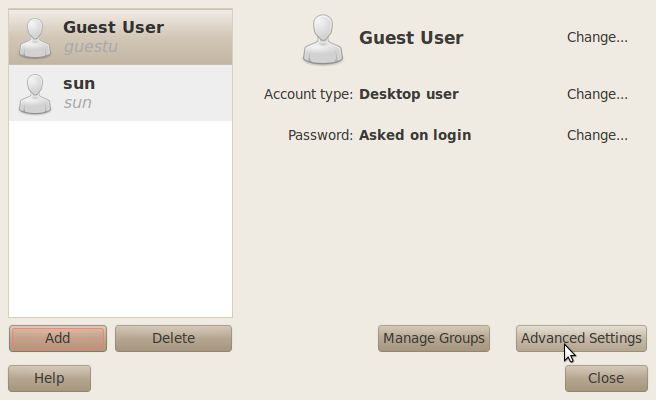
Here are the settings I’ve chosen on my test system. On a modern operating system, I think they make a lot more sense than the default settings.
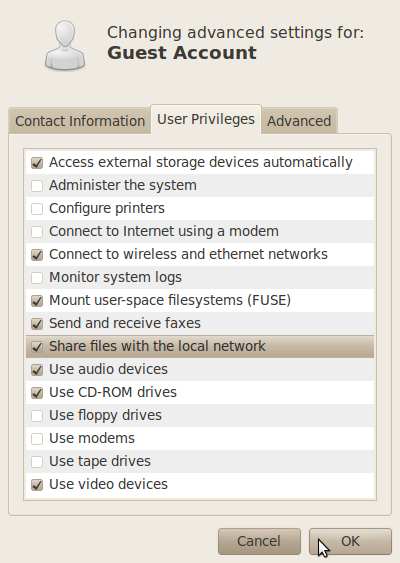
Modified guest user account privileges
If at any time the account is not being actively used, it is best to disable it. The Users and Groups tool gives you that capability. To disable the account, access the “Advanced Settings” window and click on the “Advanced” tab. Check “Disable account.”
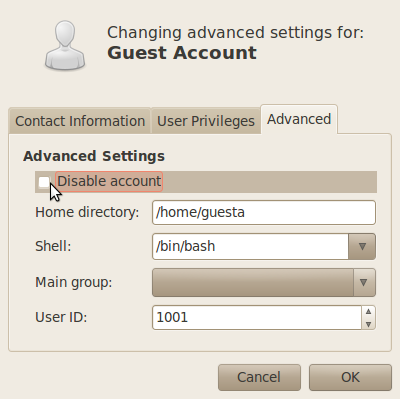
Guest user account management options
Pages: 1 2




the guest account can’t turn off ps???
I think that installing
gdm-guest-session(sudo apt-get install gdm-guest-session) would be a much better solution.Also, in Ubuntu, there is no
rootaccount because they disabled it for security reasons. The first account is in fact the Administrator account, but of course, you need to authenticate with it using sudo or gksudo by typing in your password.By “root,” I ‘m referring to the admin account, that is, the first account created during installation, and not to the traditional UNIX/Linux root account.
Since when did Ubuntu require an account with the username of root? All I’ve seen is that an account be created. I’ve had to create root afterwards with “sudo -s” and then doing the “passwd” thing to create a password for root.