
 Fedora 13 is the latest update to the Redhat-sponsored, RPM-based Linux distribution. It has long held a reputation of being a testbed for features that will eventually make it into Redhat Enterprise Linux, and, therefore, less stable than other desktop-oriented distributions. And I think that’s one reason why Fedora has features that you’ll not find on other desktop-focused distributions.
It’s not a distribution that works out of the box, but if you are willing to spend an hour or so tweaking it, you can get it to the point where it just works. With this short review, I’ll present some of this distro’s best features, features that may entice potential users. I’ll also give a listing of those features that are not very well implemented, or are missing and would, therefore, create usability issues for users – especially new users.
Let’s begin with the features I think will make you love this distro:
- Anaconda – This is the graphical installation program for Fedora. It is, in my opinion, one of the most advanced graphical installation programs you are ever going to find on any distribution. Why do I think so? Let me list the reasons:
- It’s all point-and-clicky. Very clean, intuitive interface.
- Linux Logical Volume Manager (LVM) is the default disk partitioning scheme. LVM brings a level of flexibility to disk management on Linux that is not possible with the old method.
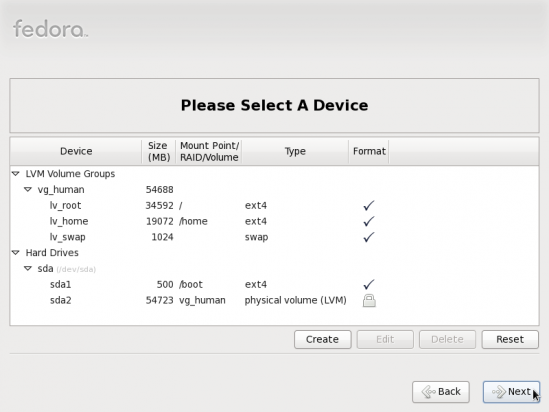
Default partitions created for Fedora 13
- Anaconda makes it very easy to encrypt the hard disk, thereby making it very easy for you to enhance the physical security posture of your computer.
- With Anaconda, it is possible to password-protect GRUB, the boot loader. Password-protecting the boot loader is one method you may use to achieve a higher physical security rating for your Fedora-powered computer.
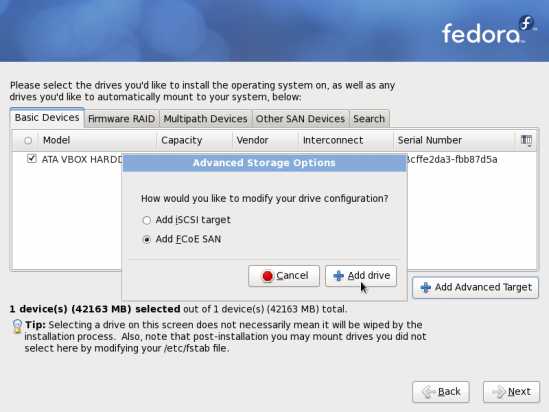
- With its advanced storage features, Anaconda makes it possible to install or upgrade to local and remote storage devices.
- You can customize application packages that you want installed.
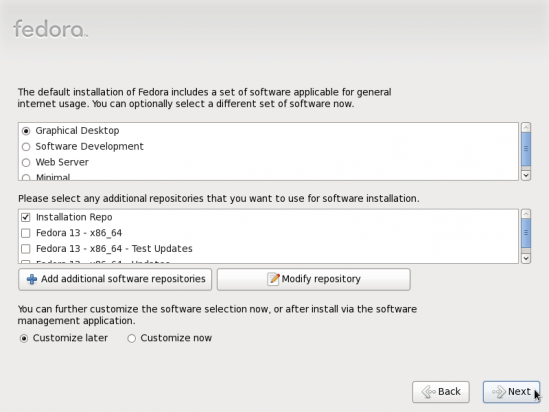
Package and repository options
- Network Time Protocol may be enabled during the installation phase.
- Advanced Firewall GUI – Fedora 13 has an advanced and easy to use graphical firewall management tool that is installed and enabled out of the box.
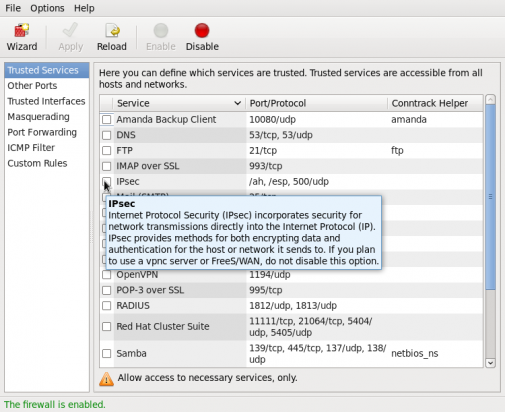
Fedora's graphical firewall management application
- Excellent update manager and update notifier that informs you in a non-intrusive manner when there are available updates that you need to install.
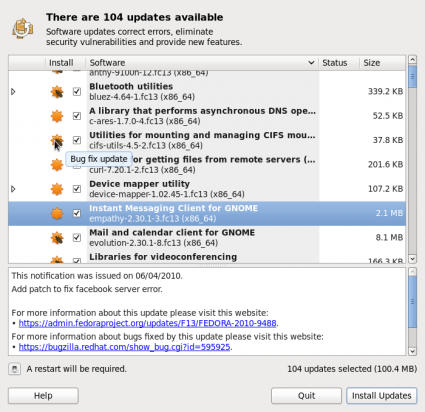
Fedora system update manager
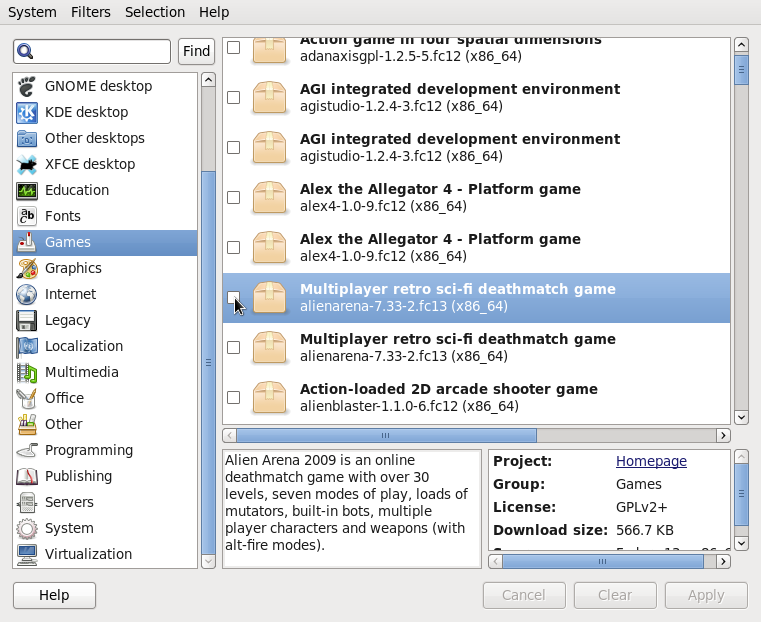
- Package Manager – Fedora’s graphical package manager is just as easy to use as any other. It does not have the visual appeal of Ubuntu’s Software Center, but it gets the job done.
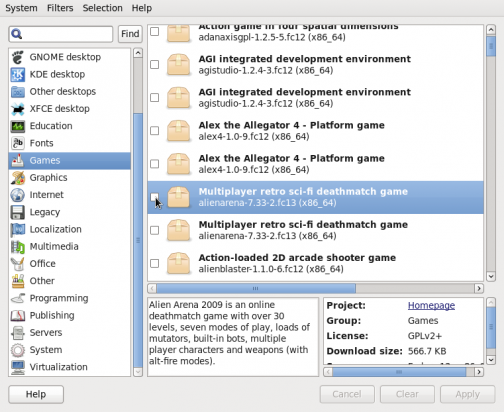
Fedora Package Manager
- Hardware detection seems better than Ubuntu’s. My old webcam which Ubuntu could not detect worked like a charm on Fedora 13.
- No Automatic Login – Automatic login makes it possible to, well .. log in automatically whenever you reboot your computer. It’s a very bad practice that I do not encourage. Luckily, the Users and Groups graphical management tool on Fedora 13 does not have this “features.”
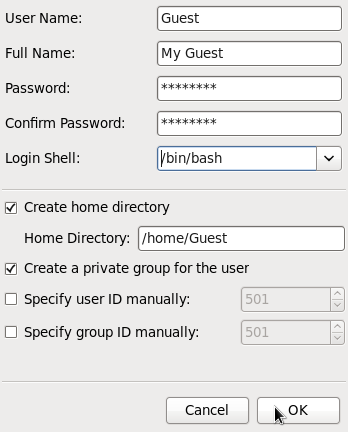
Adding user's info



*It has long held a reputation of being a testbed for features that will eventually make it into Redhat Enterprise Linux, and, therefore, less stable than other desktop-oriented distributions*
I don’t agree with that statement. I have used Linux since around 8 years my first distro was Mandrake 9.0. Tried Mandrake/Mandriva/Suse, Mepis, Ubuntu, Mint and even Vector and counterpart Slackware.
Stayed with Fedora the longest! Starting with f11 now F13. It’s the most stable I’ve had out of all of the mentioned. Hasn’t had not one single X crash.
This is enough to make me convinced Fedora is ready for the desktop.
I hope i don’t have to recreate my 3g Internet connection every time start up like ubuntu 9.10. It connect successfully but no Internet activity ie ping if i login for the 2nd time. i need 2 recreate a new 3g connection if i want 2 go online successfully. weird?
I liked the auto-login feature. As a home computer, it is a pain to login to everything (keyring, etc…).
Auto-login is cool until an untrusted party gains physical access to your PC. Auto-login also makes it very easy to forget your password. That is another way of saying that forcing password-logins ensures that you’ll never forget your password, that you will never find it necessary to write it down, which you are not really supposed to do.
I use my home computer for browsing, and never have it remember passwords. There is no “physical security” concern with this computer. I just want to log in to check my email, do some light word processing, read blogs, etc. I have nothing whatsoever I care about on it.
I guess someone could break into my house, on an island off Korea, and install a keylogger. Huh.
Auto-login is, definitely, a feature that developers ought to install, although not be default.
SELinux is hard for most people to wrap their head around. For a simple desktop user who is their own sysadmin, SELinux seems to be more of a pain that a tool. To a professional sysadmin with hundreds or thousands of web facing machines or mission critical servers, SELinux stops security problems by partitioning applications from network ports, users from applications, and root from breaking things. Even if a user managed to exploit a privilege escalation exploit, SELinux won’t allow the transition. A user must KNOW the root password to run newrole and become the secadm to change SELinux settings.
The advise of “turn it off” has been given far to flippantly in the past and it continued here in a review. That puts the reviewer in the “amateur” column of users.
Fedora is the leading edge of what the next generation of RedHat will be. That is certainly the truth. But it is only by pushing that envelope that the entire Linux field progresses.
So quit your whining an learn how to use SELinux. You will benefit and the entire Linux community will move forward. RedHat made the first move to use elf formatted binaries. All the other distros soon followed after they groused for 6 months. Using SELinux will require more than a drive reformat so the adoption cycle is longer. But it puts the system security well above the offerings of Windows and Mac systems. I like knowing that “bad people” can’t do “bad things” to my servers.
This review, and all the distro reviews on this site, is obviously not for “a professional sysadmin,” and ,therefore, the advice to disable SELinux does not address that crowd. Guru-level users, like yourself (right?), do not need a review of a distro they already use.
So I’m not “whining,” and I already know how to use SELinux. However, for my target audience, I think it’s prudent to steer them away from a tool like SELinux, especially when they do not need it.
I like fedora, but for a computer that I use for reading the likes of this, what do you knead a password protected login and then turn off selinux.
This is MY computer, NOT yours, so let me do what I want with it, I want to autologin and turn the firewall off and selinux off, If I wanted all that security I would use windows. HA
Webcam support is kernel and not distro specific, whatever cams that work in Fedora also work in Ubuntu Lucid.
Not if Fedora is using a .33 or 34 kernel and Ubuntu is stuck on .32
In that case any distro with even newer kernel would have the advantage, sidux was released few days back and has latest 2.6.34 kernel so I am sure it would have even better support.
not true IMO
http://fedoraproject.org/wiki/Features/BetterWebcamSupport
XBMC can be installed from the RPMFusion repositories for Fedora.
The review request explains why it could not be added to the default Fedora repositories:
http://bugzilla.rpmfusion.org/show_bug.cgi?id=1030