Happy New Year! Forget all that stuff about the Mayan Calendar. Be Cool!

Latest Reviews & Tutorials

  • How to customize Linux Mint 12 KDE
  • Linux Mint 12 KDE review
  • GhostBSD 2.5 review
  • How to install Takeoff Launcher on Fedora 16 KDE
  • Install Quick Access on Linux Mint 12 KDE or any KDE installation
  • How to install Linux Mint 12 KDE on a btrfs file system
  • Manual disk partitioning guide for Linux Mint 12 KDE
  • How to compile and install Takeoff Launcher on Linux Mint 12 KDE
  • 3 must-have extensions for Fedora 16 and other GNOME 3 installations
  • How to install Razor-qt on Linux Mint 12 KDE
  • How to enable desktop slideshow on Linux Mint 12 KDE
  • KahelOS 111111 review
  • How to install Cinnamon in Ubuntu 11.10
  • How to customize Cinnamon on Fedora 16 and Linux Mint 12
  • How to install Cinnamon on Fedora 16
  • What does Cinnamon bring to the desktop?
  • How to access Microsoft Windows files and folders from Linux
  • How to dual-boot Pear OS Panther 3 and Windows 7
  • How to dual-boot Chakra Linux Edn and Windows 7, part 1
  • Linpus Lite Desktop 1.6 review

Sabayon 5.3 installation guide


I am reading page: 1 2 3

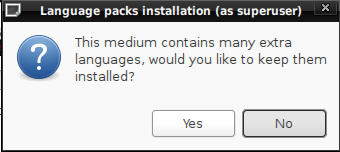
  • Language Packs – This is the last step before the installation begins, Make your choice, then sit back and watch as Anaconda completes the final stage of the installation process.
    i18n

    Language installation options

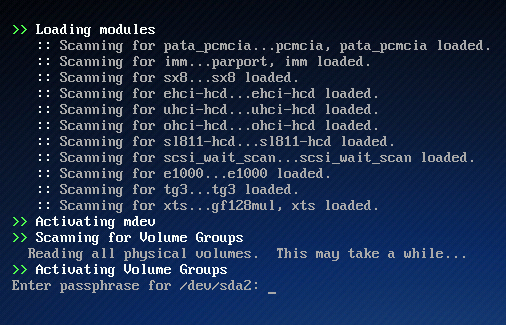
  • Passphrase Request -If you followed the instructions in this guide and opted to encrypt the disk, the image below represents want you’ll see whenever you reboot the computer. Without the correct passphrase, you will not be able to access your date. Disk encryption is an excellent physical security feature, but it can also work against you – if you forget the passphrase.
    Passphrase

    The disk encryption passphrase is being requested.

If this installation guide has been useful to you, and you wish to be notified when more like it are posted, you may subscribe to this site’s RSS Feed, or by email.
0saves
To have articles like this delivered automatically to your Feed Reader or Inbox, subscribe via RSS or email. For simple comments, use the commenting system, but for more involved assistance, please use the Question & Answer section.
I am reading page: 1 2 3

Posts From The Same Category:


Questions & Answers Hola! Looking for an answer to a question but did not find it? Then surf on over to the Questions & Answers section. It's a brand new addition to our site, and we are waiting just to answer your question(s).

No Comments

    Leave a Reply

    Trackbacks

    1. Linux News » Sabayon 5.3 installation guide
    2. Links 10/6/2010: KDE SC 4.5 Beta 2, OSI Election | Techrights
    3. Sabayon 5.3 Released | REVIEWGLITZ
    Read previous post:
    How to customize Linux Mint 9
    Linux Mint 9 review
    Fedora 13 review
    Close