
- When installing Linux as the second operating system, there are several partitioning options available to you. Those options are best illustrated with those presented by Anaconda, the Fedora-developed installation program.
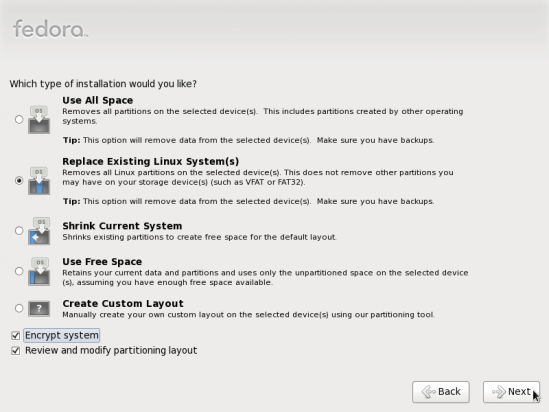
Disk partitioning options
For new users, the third and fourth options – Shrink Current System and Use Free Space, will allow the installer to automatically create the partitions needed to install Linux on the hard drive. If you want to create a set of partitions different from the default created by the installer, you’ll have to select the last option – Create Custom Layout.
An example of how to dual-boot between two Linux distributions is available here. The same method may be used to dual-boot between any Linux or BSD distribution and any version of Windows.
Pages: 1 2




hi i tried to dual boot pardus and windows 7..
i have dual booted many linux os with windows but with pardus i cant dual boot it,..i have already installed win 7 then installed pardus..it dint work..
then i installed pardus first and win 7 later..i tried to do dual booting ,using bcd ..i created 2 options at boot..windows 7 and pardus..win 7 boots fine..but when i select pardus nothing happens..just a black screen with a blinking cursor..could u pls make a video of this and upload in you tube..
if u cant make a video then please give all the screenshots of this installation that is DUAL BOOTING WINDOWS 7 AND PARDUS.. ,,especially for selecting the partitions and using bcd..PLS HELP ME..I LOVE THAT PARDUS OS..BUT CANT REMOVE WIN 7 SINCE MY PARENTS NEED IT..