
-
Boot Loader Security – One physical security feature I like to use and always recommend to other users is the boot loader security feature. This gives you the option to password-protect the boot loader. Boot loader password protection is one of five methods you may use to boost the physical security rating of your computer. I like the fact that the installer gives you this option.
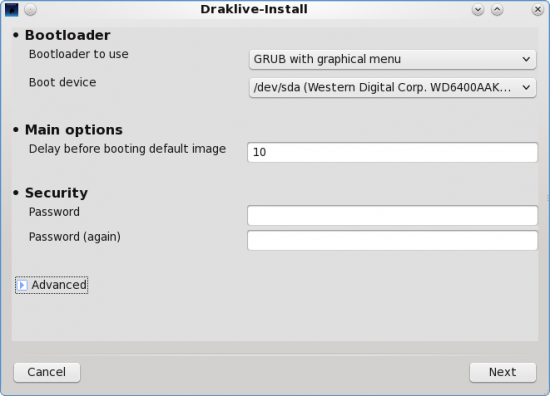
GRUB configuration
- Available Software – The repository has all the applications – free or non-free – that virtually all desktop users will ever need to use. Skype, Realplayer, libdvdcss2, Moovida, XBMC, Dropbox, etc, are either installed or available in the repository. You won’t have to go digging for third party repositories to add to the system.
Final Thoughts – One of the most important aspects of any distribution is the installer. In my opinion, a good installer is one that makes all the features built into the Linux kernel (and its supporting applications) available in an easy to configure manner. It can set a distribution apart from the field. It’s one of the better features of Fedora and Debian, and it is one of the weakest aspects of PCLinuxOS. Its installer is dated. It has not even kept up with that of Mandriva, the distribution it was derived from. I think the developers should consider switching to Anaconda, Fedora’s installer. Anaconda is also used by Sabayon.
The default configuration of PCLinuxOS is just sloppy. There is no (good) excuse for it. The community can do better than this, especially for a version designed for new users. Features that should be enabled out of the box, should. Users, especially new users, deserve a better user experience.
Resources – As noted earlier, there is an iso image for virtually all existing desktop environments available for download here. The KDE version used in this review may be downloaded from here.




have used many distro..pclos sucks big time.
Pity the software in Pardus Distro is so out of date
Manjaro is the new standard
I agree. I prefeer Linux Mint or Pardus 2011. Very nice forums there.
I installed PCLOS yesterday. After coming in contact with this PCLinuxOS review page and seeing what kind of people populate the community….I want no part of it. It’s off to Linux Mint Debian for me where the natives are friendly and don’t think they know everything. Why would I ever want to ask for help from a community that that displays the attitude I see displayed here.