
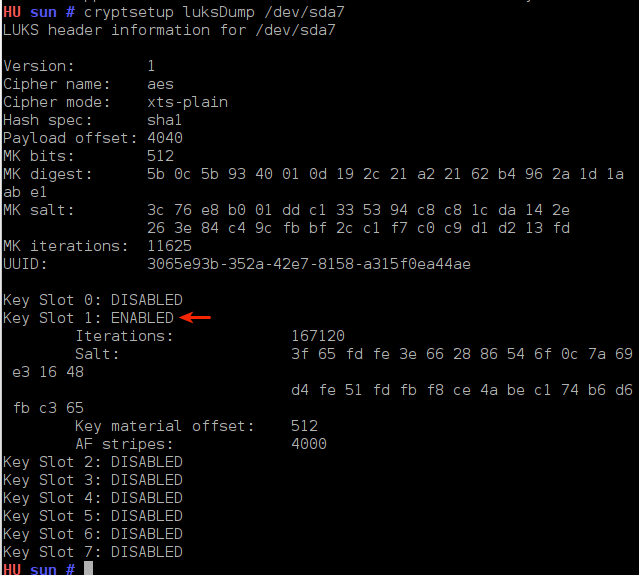
Now, when you do a cryptsetup luksDump /dev/sdaX, you will see that you now have two key slots (key slot 0 and key slot 1) in ENABLED status.

Two active key slots
With a backup passphrase in place, it is now save to delete the first key that you wanted to delete. And you delete a key, that is, disable a key slot, by typing cryptsetup luksKillSlot /dev/sdaX Y. In this command, “Y” is the key slot that you want to disable. In this particular case, the command will be cryptsetup luksKillSlot /dev/sda7 0 because we are attempting to delete the passphrase stored in the first key slot (key slot 0).

Deleting a passphrase
If you do another cryptsetup luksDump /dev/sdaX, you will see that the first key slot, key slot 0, is in DISABLED status.

Key dump
Now that you have just one active passphrase, you may want to create another one as a backup, and you can create one in any of the available key slots, including the one you just disabled.
I hope the information presented here has given you some insight into disk encryption passphrase management. This is introductory information. There are more advanced key management tasks that I will address in a future post. Corrections and questions are welcome.



Opensuse also supports disk encryption (and LVM) natively in its GUI install program.