LinuxBSDos.com
  • Home
  • About
  • Contact
  • Sitemap
  • I See, I write
Subscribe

How to enable auto-login and create a guest user account on Fedora 14

in fedora, Tutorials/Tips / on November 12, 2010 at 6:35 am /

FedoraFedora is one of very few distributions that does not have the auto-login feature in its graphical user management tool. Auto-login allows the system to automatically login a user without requesting authentication, that is, it enables password-less logins. While it is a very convenient feature, it is a security risk. Why? Because if it is enabled, any person with (physical) access to you computer can login and use the computer, with the same privileges that you have. So it is a good thing that Fedora’s Users and Groups tool lacks the auto-login feature.

There is, however, always a way around these things. So If you understand the security risk that auto-login presents, and you still want to use it, this article will show you a very simple method of enabling it on Fedora 14. It will also offer a guide on how to create and manage a guest user account.

Auto-login: Enabling auto-login is, as they say, a piece of cake. Say, for example, the user account you are trying to enable auto-login for is jane. All you need to do is launch a shell terminal (Applications > System Tools > Terminal), su to root, and type passwd -d jane. Now, you or jane or anybody else can log into the computer without authenticating.

Other than from a shell terminal, the accountsdialog package may also be used to enable auto-login. It is not installed by default, and it appears to not be ready for prime time.

Guest Account: Want to give a friend or family member access to your Fedora-powered computer, but do not want them to have administrative control? Not a problem. By installing the xguest package, the same installed by default on Mandriva, you can let anybody use this account, knowing that they will not be able to assume root privileges. The next set of images will help you to install and enable the Guest account.

The first step is to install the xguest package using yum install xguest, or via the graphical package manager (System > Administration > Add/Remove Software).
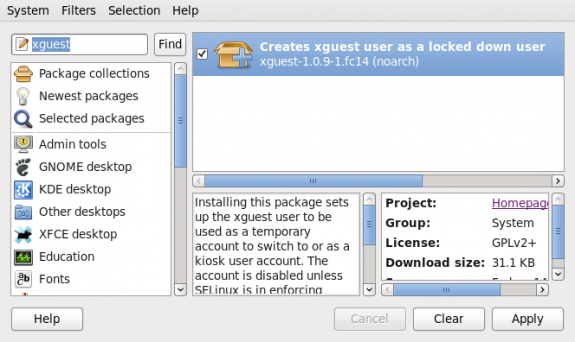
xguest

Install xguest

After installation is completed, launch the Users and Groups tool (System > Administration > Users and Groups). The guest account with will be listed as the xguest username. At this point, it is unusable. So select it and click on Properties.
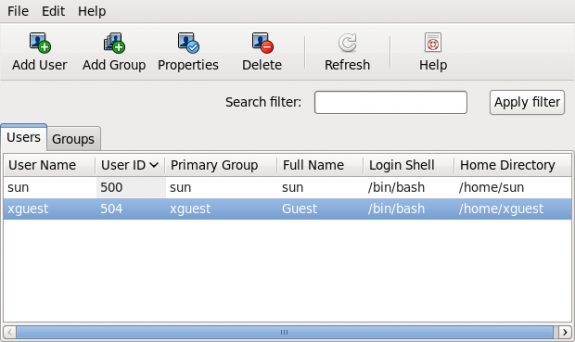
xguest1

User accounts

You can see that the password field is greyed out. Click on the Account Info tab.

xguest2

Guest properties

This is why the password field is greyed out. The password is locked. Click on the checkbox to unlock it.
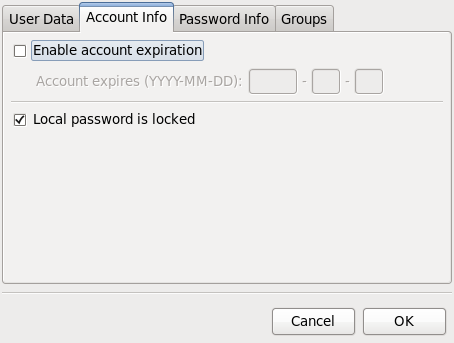
xguest3

Guest properties

With the account unlocked, click the User Data tab.
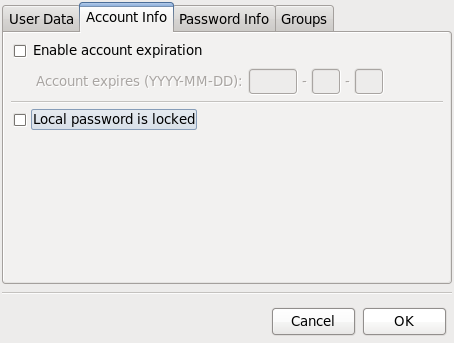
xguest4

Guest properties

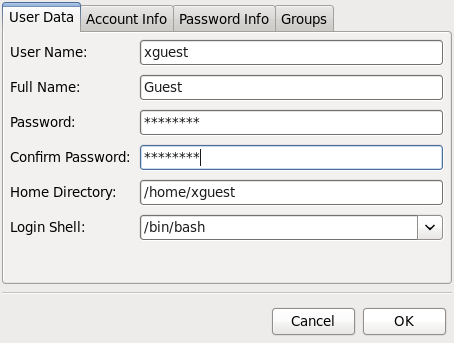
Set a password for the account. Click OK. Now, the account can be used by anybody with the password.
xguest5

Guest properties

Anybody using the guest account cannot su to root and, therefore, cannot perform any task requiring authentication as root.
0saves
Save
To have articles like this delivered automatically to your Feed Reader or Inbox, subscribe via RSS or email. For simple comments, use the commenting system, but for more involved assistance, please use the Question & Answer section.
Tags: auto-login, guest accounts

6 Comments

  1. Runnie Jones says:
    March 10, 2011 at 2:42 pm

    can fedora 14 be install 64bit
    systems.

    Reply
    • finid says:
      March 10, 2011 at 2:54 pm

      Yes.

      Reply
  2. bachitux says:
    November 12, 2010 at 7:38 pm

    Excelent tips! Thanks for sharing…

    Reply

Leave a Comment

Click here to cancel reply.

Ad

Subscribe by Email

Sign up to automatically receive the latest articles and tutorials in your Inbox.

Reach out & follow us

  • Follow us on TwitterTwitterFollow us on Twitter
  • Join a prestigious circleGoogle PlusJoin a prestigious circle
  • Subscribe to our RSS FeedRSS FeedSubscribe to our RSS Feed
  • Reach out to us via emailEmailReach out to us via email
 

Recent Comments

  • finid: The Slatebook x2 on the other hand, when it’s starts shipp…
  • Ummi: What is the price of this tablet? …
  • finid: Well, considering that Microsoft makes more money from Andro…
  • W. Anderson: The sad aspect of this potentially new approach and product …
  • en: "blacklist configuration for Zeitgeist (control center integ…

Friendly Links

DHgate Computers Electronics, Cell Phones & more

London Phone Number from City Numbers Ltd

Upgrade from Windows 8

Close Windows, Open Doors

Desktop & Server

  • ALT Linux
  • CentOS
  • Debian
  • Fedora
  • Foresight
  • gNewSense
  • Knoppix
  • Linpus
  • Mandriva
  • Mint
  • Pardus
  • Parsix
  • PCLinuxOS
  • Sabayon
  • Ubuntu
  • Vine Linux

System/Network Admin

  • Clonezilla
  • GRML
  • Parted Magic
  • SystemRescueCd

NAS & SAN

  • FreeNAS
  • Openfiler

Mobile & Cloud

  • Android
  • Bada
  • LiMo
  • MeeGo
  • Symbian

BSD Distros

  • DesktopBSD
  • FreeBSD
  • MirOS BSD
  • NetBSD
  • OpenBSD
  • PC-BSD
  • TrueBSD

Firewall & Router

  • Astaro Security Gateway
  • BackTrack
  • ClearOS
  • Devil-Linux
  • Endian Firewall Community
  • EnGarde Secure Linux
  • Gibraltar
  • IPCop
  • IPFire
  • NuFW.Live
  • pfSense
  • SmoothWall Express
  • Untangle Network Gateway
  • Vyatta
  • XORP
  • Zentyal

Recent Posts

  • Antergos Linux 2013.05.12 reviewAntergos Linux 2013.05.12 review
  • NVIDIA SHIELD: Android game console, with Tegra 4 insideNVIDIA SHIELD: Android game console, with Tegra 4 inside
  • SlateBook x2: Tegra 4-powered Android hybridSlateBook x2: Tegra 4-powered Android hybrid
  • ROSA Desktop Fresh LXDE alpha previewROSA Desktop Fresh LXDE alpha preview
  • Apache OpenOffice: Help pick a new logoApache OpenOffice: Help pick a new logo
  • Crowdfunding a FOSS accounting software for NPOs
  • A backdoor in all Internet products and services?
  • Windows 8: The most important reason to switch to LinuxWindows 8: The most important reason to switch to Linux

Popular Since Forever

  • How to dual-boot Ubuntu 12.04 and Windows 7 483 comments
  • How to dual-boot Linux Mint 13 Cinnamon/MATE and Windows 7 287 comments
  • How to dual-boot Windows 7 and Ubuntu 11.04 135 comments
  • Dual-boot Windows 8 and Ubuntu 12.10 on UEFI hardware 128 comments
  • Dual-boot Ubuntu 12.04 and Windows 7 on a computer with 2 hard drives 114 comments
  • Should the root account be disabled in Fedora 18? 101 comments
  • PCLinuxOS 2010 review 84 comments
  • Install Ubuntu 11.04 on external hard disk 82 comments
  • Dual-boot Linux Mint 11 and Windows 7 80 comments

Menu

  • Home
  • About
  • Contact
  • Sitemap
  • I See, I write

Search

Categories

Archives

Subscribe by Email

Sign up to automatically receive links to latest posts and tutorials in your Inbox.

Reach out & follow us

  • Follow us on TwitterTwitterFollow us on Twitter
  • Join a prestigious circleGoogle PlusJoin a prestigious circle
  • Subscribe to our RSS FeedRSS FeedSubscribe to our RSS Feed
  • Reach out to us via emailContact usReach out to us via email
 
Copyright © 2013 — LinuxBSDos.com. All Rights Reserved.