
This is the “Edit Partition” window. For the boot partition, be sure to select /boot as the mount point. For the file system, you may select ext2, as in this example, or ext3 or ext4. For the root and home partitions, /dev/sda7 and /dev/sda8, the mount points must be / and /home respectively, and the file system can be any available journaling file system except btrfs. Keep in mind that Ext4 is the default on virtually all Linux distributions. Do not format the swap partition, just mount it as swap.

If you are satisfied that the mount points and file systems types have been selected, click Forward to continue with the rest of the installation.

By default, the installer installs GRUB, the boot loader, on the Master Boot Record of the hard disk. Because of the recommendation made at the start of this article, we want to install GRUB in the boot partition of the LMDE installation. In the scheme used in this tutorial, the boot partition is /dev/sda5, the first logical partition. Select it from the dropdown menu and click Forward.

After installation of LMDE is completed, the system will reboot into Windows 7, and that is because Windows is not aware that it now shares the hard drive with another OS. The final task then is to add an entry for LMDE in Windows’ boot menu. The easiest method of doing that is to use EasyBCD, a proprietary but free application from NeoSmart Technologies. So, download EasyBCD, install and launch it. Click on the Add New Entry tab, then click on the Linux/BSD tab. From the Type dropdown menu, select “GRUB 2” (LMDE uses GRUB 2 as its boot loader). Click “Add Entry” button, then on the Edit Boot Menu tab.

By default, Windows 7 will be booted first, but you may change that to LMDE. If you make any changes here, click on Save Settings before exiting EasyBCD.

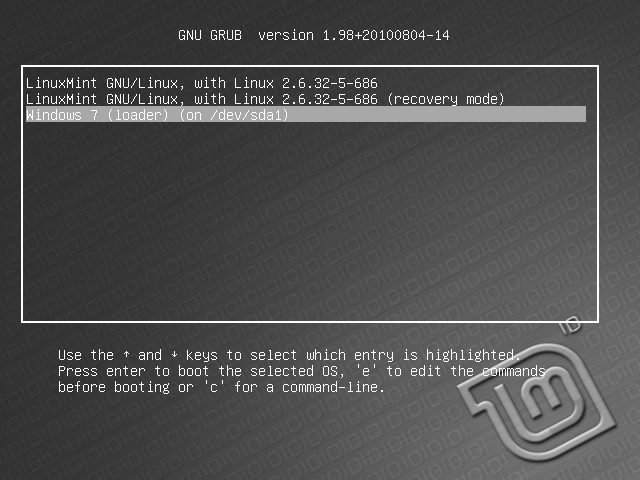
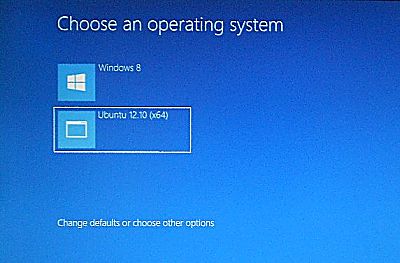
On every reboot, you will get this.

And if you select LMDE, you will get this. If for any reason you change your mind, you can still boot into Windows from here by selecting the Windows 7 entry.

You can have quality articles like this delivered automatically to your feed reader or inbox by subscribing via RSS or email.




What about multi boot with Mint on secondary disk?
That’s even simpler. Install Windows on disk 1, then install Mint on disk 2. Expect a tutorial on that soon. I’m assuming your PC has Windows 10 or 11, right?
Thank you for an excellent guide!
There are so many ‘tips’ on this topic and incomplete guides out there on this topic.
Your setup is the best and your steps very well explained. I couldn’t have done it without you.
For those looking for a video… This same method is shown by Matthew Moore on You Tube, where he explains exactly why this is superior to other methods:
Mint Debian here we go!
Thanks a million for a good and easy to understand guide to set up LMDE along side with Windows 7. I especially appreciate your idea of keeping the two completely separated and keeping grub on /boot 😀
It doesn’t work. I’m not able to choose /dev/sda5 (my /boot partition) for GRUB installation. In dropdown list I have only /dev/sda or /dev/sda1 (windows boot partition).
Strange! Do you see the partitions you created in the list above the dropdown menu?
No. I see only sda (whole) and sda1 partition.
In disk manger I see everything. In Gparted I see all the partitions. But not in dropdown menu. I use live image on USB.
It shouldn’t matter whether you are using a live image from USB or from a CD/DVD. There should be a list of created partitions in that menu.
Note that this tutorial is from 2011, so if you are using a recent edition of LMDE, it is possible that there is a bug in the installer. I’ll have to attempt an installation using it to see what’s going on.
What edition of LMDE are you trying to install?
The latest – 201303. I’m trying to make something with it. So I will report it.
I get a grub> command line instead of GUI?
What’s the size of your disk, the size of the Windows partitions, etc
Thanks a Tonnnnnnnnneeeeeeeeee.
It was just Great.
Thanks for the tutorial. It worked perfectly! 😉 I wish I would have left some space in my HDD to try Linux Mint 13 when its released… Would I be able to partition more space from the Linux partition we created here?
If you have unallocated space or unused space left, yes.