Latest Reviews & Tutorials

  • Disk encryption in ROSA Marathon 2012
  • How to dual-boot Ubuntu 12.04 and Windows 7
  • Still in search of that perfect desktop distribution
  • The first thing to do after installing Linux Mint Debian 201204
  • Linux Mint Debian 201204 Xfce review
  • What will ‘rm -rf /’ actually do to your Linux/BSD machine?
  • Linux Mint Debian 201204 MATE/Cinnamon review
  • What’s the point of having 2 scrollbar types in Ubuntu 12.04?
  • Install the latest and greatest Cinnamon desktop on Ubuntu 12.04
  • How to run Linux Mint Debian Cinnamon in VirtualBox
  • Manual disk partitioning guide for Linux Mint Debian
  • Chakra Archimedes-2012.04 review
  • How to install Takeoff Launcher on Kubuntu 12.04
  • Replace Oxygen with ROSA theme on any KDE-powered distribution
  • 5 user-friendly applications you could be using now
  • ROSA Desktop 2012 beta review
  • How to install Jitsi in Fedora
  • Install Jitsi 1.0 in Debian, Linux Mint and Ubuntu
  • 3 minutes with GNOME 3.4 built-in desktop recorder
  • How to install and configure a graphical firewall client on Comice OS 4

How to dual-boot Windows 7 and Ubuntu 11.04


I am reading page: 1 2

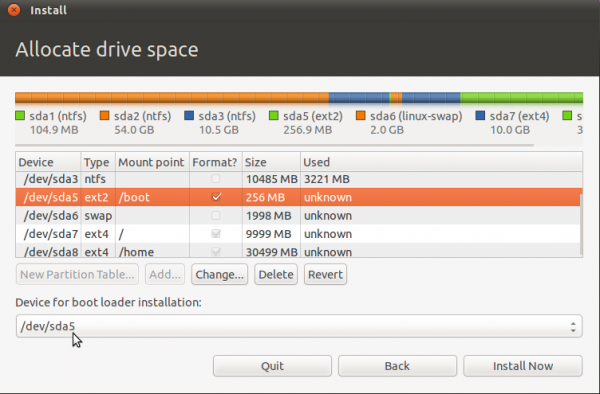
All the partitions have been configured. You may continue with the rest of the installation. But before you do, decide where you want to install GRUB, the boot loader. You may install it in the Master Boot Record (MBR), the default, or in the boot partition (/dev/sda5 in this example). A good case can be made for either choice.

If you install GRUB in the MBR, it will overwrite Windows’ boot programs. This is the most common and requires no other configuration on your part. However, upgrading or reinstalling Windows, or even installing a Service Pack can overwrite certain aspects of GRUB. Restoring GRUB is not a very difficult task, but you can save yourself the trouble by installing GRUB in the boot partition of Ubuntu. This is the recommended method because it completely separate the two operating systems, even as they co-exist on the same disk. It does requires additional configuration on your part. That, however, is nothing compared to the potential headache of the other option.

For this tutorial, I will follow my recommendation and install GRUB in /dev/sda5, the boot partition. Note that the version of GRUB used by Ubuntu 11.04 is GRUB 2.
dualBoot10

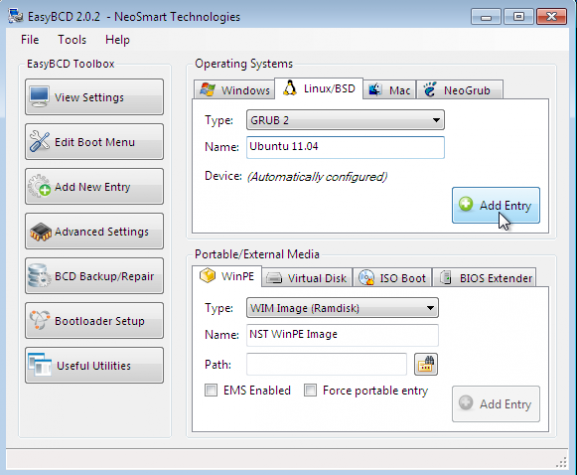
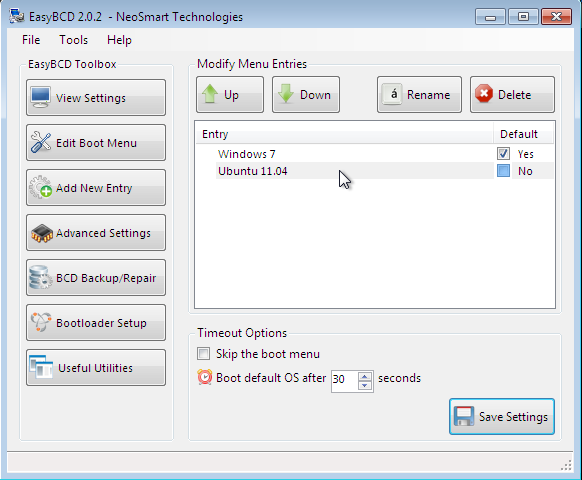
After installation and reboot, the computer will reboot into Windows. The final task then is to add an entry for Ubuntu in the boot menu of Windows 7. For that, the easiest program to use is EasyBCD, a free program by NeoSmart Technologies. Download and install it like you would any Windows 7 application. Start it and click on the Add New Entry tab, then on the Linux/BSD tab. From the “Type” dropdown menu, select “GRUB 2,” the version of GRUB used by Ubuntu 11.04. Click on the “Add Entry” button. Click on Edit Boot Menu tab to view the new configuration.
dualBoot12

These are two entries you will see every time you boot the computer. The default is Window 7, but you can change it to Ubuntu 11.04 if you like. Exit EasyBCD and reboot.
dualBoot13

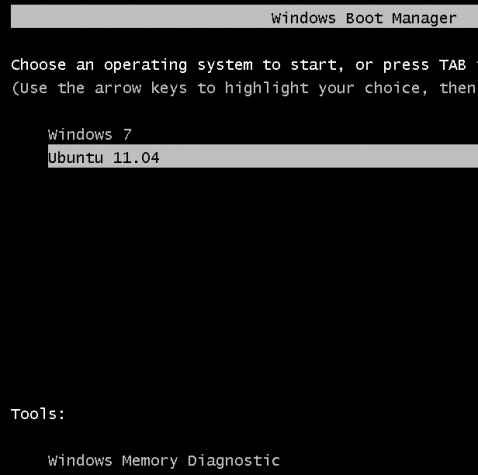
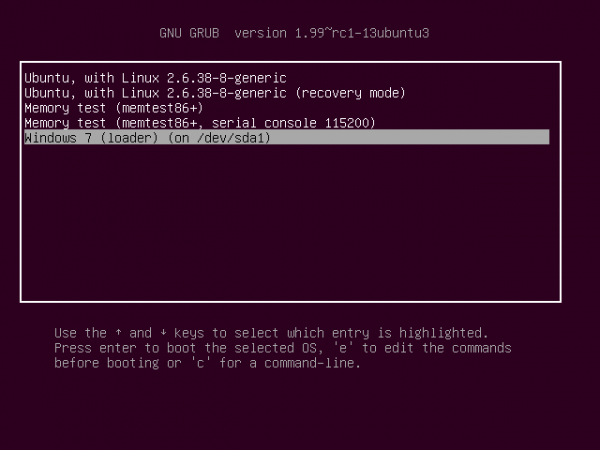
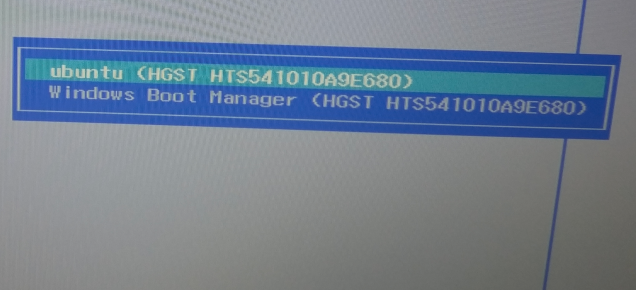
This is the boot menu you will see.
dualBoot14

And this, when you attempt to boot into Ubuntu. Note: If at any time you decide to have GRUB be responsible for dual-booting, you can do so easily. Just log into Ubuntu and write GRUB to the Master Boot Record, or MBR. And if you want to switch back to Windows’ boot manager, log into Windows 7, start EasyBCD and use it to overwrite GRUB.
dualBoot15

You can have quality articles like this delivered automatically to your Feed Reader or Inbox by subscribing via RSS or email. This website now has a Questions and Answers section. Use the commenting system for simple comments, but for more involved assistance, please use the Questions and Answers section.
0saves
To have articles like this delivered automatically to your Feed Reader or Inbox, subscribe via RSS or email. For simple comments, use the commenting system, but for more involved assistance, please use the Question & Answer section.
I am reading page: 1 2

Posts From The Same Category:


Advertisement

127 Comments

  1. Ravindra Siwach says:

    Apparantly this doesn’t work with Ubuntu 12 but only with Ubuntu 11. I am assuming all those who got a failed to install GRUB in /boot were trying to install Ubuntu 12. I have tried 5 times with some little tweaks to install GRUB in /boot for Ubuntu 12 i.e. increasing /boot partition size, changing the format to ext4 etc but nothing works. I even set me partitions the same way so there is no misunderstanding. Now when I installed Ubuntu 11, it works fine for me. GRUB was easily installed in /boot and there were no problems at all. Please look into this. Try a fresh intall yourself and see what the problem is. Thanks.

    • finid says:

      Sure, I’ll give it a fresh look later this week.

    • nmcaz says:

      Just tried this tutorial on a Vbox virtual machine, with Windows 7 and Ubuntu 12.04 and it works perfectly.
      Next step: trying it on my laptop :)

      • finid says:

        Some people seem to be having problems with 12.04. Let us know if it works for you on your laptop.

        • nmcaz says:

          I still haven’t installed ubuntu 12.04 in my laptop,maybe later in the week. But in my “experiences” I ended up repeating the same process to dual boot windows 7 and xubuntu 12.04 (again in a VBox machine). This time I ended up with the same fatal error when trying to install GRUB in /BOOT partition. The only difference betwen the two processes was deactivating the PAE for xubuntu. Tomorrow i’ll try again with Ubuntu 12.04, with PAE activated, as in the first try I made.
          I’m relatively new to linux, and have a lot to learn, so I really don’t yet understand the reason why the fatal erros occured this time (Desktop environment, kernel, PAE, ???). Any ideas on this?

          • nmcaz says:

            Well, I don’t know why, but after trying the exact same install as I did sucessfuly the first time, I got the fatal error message, and my installation did not finished… Have no idea why…
            Has anyone had better luck with this issue?

          • finid says:

            Check back tomorrow. I’ll update this tutorial for 12.04. If you have not done so already, you may subscribe to this website by RSS or email, so it will be delivered to your inbox or Feed Reader automatically.

          • finid says:

            Just wrote an update to this article using Ubuntu 12.04. You may read it here.

  2. Slaughter83 says:

    Hi there! I ran into a little problem with my installation. Everything went just fine untill it was supposed to install the grub then i got a fatal error but I solved that with choosing /dev/sda5 again and then the installation completed. Then I followed your steps for for easyBCD and when i reboot I can choose Ubuntu 11.10 but then I get into a commandprompt lokking like this

    /GRUB

    and a text that tells me I an get commands by presing TAB and when I do that I get a bunch of commands. But I don´t know how get any further. So should I try to do the Bootrepair or is something elese wrong?

  3. toopiar says:

    Hi. In the step where you recommended installing GRUB in the /boot partition of Linux, I forgot to set it there and ended up installing it in the MBR. Is there any way to restore the windows bootloader and reinstall GRUB into the /boot partition? Thanks.

  4. Mote pandurang says:

    how to get back ubuntu after installing win7 in case of dual boot

  5. Andrew says:

    So I followed your partitioning steps (I unallocated about 20 gb from windows 7). But after completing installation and attempting to boot back into windows it crashed due to hardware changes. I’m fairly certain I didn’t overwrite any existing windows drives. How can I fix this so that I can run windows again?

  6. rahul says:

    I had installed ubuntu 11.10 as main OS in partition, other than windows. But now i m not finding any option to boot windows. It just starts ubuntu, when i power on my laptop..
    Please suggest any solution. Thankyou..

    • finid says:

      Provide more details about the partitioning scheme you used and we just might be able to help you.

      How did you set up partitions for Ubuntu relative to Windows?

  7. MC says:

    If Windows 7 has two primary partitions , could I create /boot as primary partition?Is there any difference if I follow the tutorial and use logical partition ?
    Thank you very much.

    • finid says:

      You could create an extended partition for Ubuntu, and under it create logical partitions for /boot and any other partition you want to use for Ubuntu. That will leave you with 1 primary partition free.

      Or you could create /boot as a primary partition, and create the last partition as an extended partition, with the other Ubuntu partitions under it as logical partitions. This option will exhaust the number of primary partitions – 4 – that the system can support.

      either option will work.

  8. Shene says:

    Hi
    Thank you for this great article,
    I have got a problem during the installation process. In the partitioning step my “free space” is inactive and it appears as “not usable space”
    any ideas please?
    Thank you

    • finid says:

      If it is not usable, it most likely means that you have 4 primary partitions configured already.

      If that is the case, you need to delete one primary partition and create an extended partition. That will allow you to create logical partitions for the installation.

      Note: Using an MBR partition table, the system cannot support more than 4 primary partitions.

  9. Ster says:

    I followed the exact steps in this article by staring with a new Windows 7 installation. Then I installed Ubuntu 11.10 (not 11.04) with the same 4 logical partitions. I chose the bootloader to /boot but i was given a fatal error giving me the option to choose another location. Has anybody found a solution to this?

    • finid says:

      What is the exact error message? What is the size of your HDD?

    • Noah says:

      Same here. What is the fix?

      Error: “It was not possible to install the bootloader at the specified location: /dev/sda5. This is a fatal error.” It then asks to choose a different location.

      • finid says:

        What is the size of the HDD, and how far from the start of the drive is the boot partition?

        • Cricri says:

          Hi,
          Tried to do the same operation, and got the same error message !. Tried also to create the boot partition as a primary partition, but no success !!

      • Jimmy says:

        I had the “fatal error” on sda5 as well (on two separate installs). There was another thread elsewhere about this for Ubuntu 11.10. Changing the filesystem to ext4 fixed the problem. I’m too much of a linux newb to state whether or not there will be side effects from choosing ext4 over ext4.

  10. Jake says:

    Hi mate,

    Does this setting lets you view your ntfs partition? lets say i have C(Windows Files System) and D(NTFS partition). Will I be able to see those 2 partition when im on ubuntu?

    Will it still work on 11.10?

    regards,

    Jake

    • finid says:

      Yes. When you open the file manager, both partitions will be listed on the (left) pane or panel. click on them and browse away. You can also copy files to and fro.

  11. nick says:

    Is there anyway to boot to Ubuntu without installing EasyBCD? I have a problem with windows so I can’t even get it to start up, much less install any programs on it.

    Thanks

    • finid says:

      I don’t want to assume anything. If you provide a little bit more info about your setup, it would make it a bit easier to help.

      • nick says:

        I followed all the instructions you provided, so I assume Ubuntu is installed correctly. I just do not know how to boot to it, as you instruct to install EasyBCD through Windows to be able to boot to Ubuntu, but I cannot install much less use Windows.

        In other words, is there any other way to boot to Ubuntu other than using EasyBCD?

        • nick says:

          How can I get the option to select Ubuntu or Windows when the computer is starting up? I only have the option to start Windows, nothing in the BIOS has Ubuntu visible to me.

          Is there a tutorial or simple solution to this (perhaps modifying GRUB)?

          • finid says:

            If you do not have access to Windows before you completed the installation of Ubuntu, then there is no easy method to get to Ubuntu.

            It is possible to boot the system with a Live CD and reinstall GRUB in a different location, but the easiest way to solve this problem, since you are not able to boot into Windows, is to reinstall Ubuntu and then install GRUB in the MBR of the hard drive. By letting the installer put GRUB in the MBR (Master Boot Record), you wipe Windows’ boot manager, but the installer will auto-add an entry for Windows 7 in GRUB’s menu, so that anytime you boot the computer, you will be presented a choice of which OS to boot – Ubuntu or Windows 7.

            Aside from that, it will also give you the opportunity to access your files in Windows when you boot into Ubuntu.

            I’m proposing this solution on the assumption that you are unable to boot int Windows.

          • finid says:

            If you installed Ubuntu on the same drive that Windows is on (as laid out in this tutorial), then you will only have the option to start Windows when the computer first boots. There is not setting in the BIOS that will enable you to boot Ubuntu. You will first have to modify Windows’ boot menu by adding an entry for Ubuntu on it.

            And the easiest program to get that done is EasyBCD. However, if you cannot boot into Windows (as you wrote in a previous comment), then the easiest method around that is to reinstall Ubuntu and install GRUB in the MBR.

    • finid says:

      If you used the same partitioning scheme as this tutorial, then you will need to have access to Windows to complete the dual-boot setup successfully.

      Without that, there is nothing you can do, short of reinstalling Ubuntu and installing GRUB in the MBR of the hard drive.

      • nick says:

        Thanks for the ideas. That’s what I was asking for, do you know any tutorials/sites that I can read/research that will show me how to install the GRUB to the MBR?

        As you said, that seems to be the best way.

        • nick says:

          Any way you can help me on this?

          • finid says:

            Sorry. WP ate my last comment. Here it is:

            There are 2 methods to try and solve this problem. The easiest might be to reinstall Ubuntu and install GRUB in the MBR (Master Boot Record) of the disk, rather than in the boot partition. You do that by skipping the step where the tutorial says to change the boot loader location from /dev/sda to /dev/sda5 or whatever the partition number of the boot partition is.

            The other method, which I am yet to try, is to boot the computer with the Ubuntu installation CD. Once in the Live Desktop, start a shell terminal and run sudo grub-install /dev/hda or sudo grub-install /dev/hd0. This link has more info on this and other GRUB commands.

            Keep us posted on the results – good or bad.

  12. Arcan says:

    Thanks for this great work.
    I have followed your steps, but at the end of ubuntu installation I got a message that says can’t install boot loader to the specified location. I then tried many other locations but every time I got the same message.

    Can you help me in this?
    Thanks

    • finid says:

      Are you attempting to dual-boot on a single hard drive, and are you using the same partitioning scheme as the article?

      • Arcan says:

        Yes, I have windows 7 already installed and I have a single hard drive.

        I followed the same partitioning scheme you had explained.

        Thanks

        • kp says:

          I had the same issue. Went with install boot loader on MBR. Tried to load ubuntu after configuring EasyBCD and it went to a screen with the following:

          grub>

          any ideas?

          • Anthony Zhang says:

            I got the same error. When Ubuntu asked me to choose a different place to install grub, I chose sda5 (my /boot) again and it worked.

            However, I have the same problem as kp. After using BCD as per the tutorial, I was met with the grub> screen.

          • Anthony Zhang says:

            https://help.ubuntu.com/community/Boot-Repair

            Boot repair was able to solve this problem for me!

          • Adnan says:

            Same issue as above. My scenario is Windows 7 on primary and I installed Ubuntu on the slave. Followed the steps as above and in the end got GRUB error. After this I chose the slave /sdb5 I think and the installation finished. Booted into Windows and installed EasyBCD. But as shown on the first screen of EasyBCD above, I don’t see the option of GRUB2 under ‘Type’. I can understand that GRUB ever got installed maybe or is not on the primary partition, but what should I do from here? I wonder if I should just have taken the ‘Install alongside windows option and let Ubuntu handle all this!. Any help is appreciated.

          • Anthony Zhang says:

            Damn, still using master/slave drives? Get dat dere SATA! joking aside:

            My windows installation was first as well, however, I installed ubuntu on a separate partition on the same drive.

            Are you using the most current version EasyBCD? My grub didn’t install properly either and still I had to GRUB2 option in EasyBCD.

            Once again, try using boot repair. Boot repair allows you to install grub wherever you want.

  13. Shockostar says:

    Thank youuu! this tutorial is just what I was looking for.
    Now I’m able to pick from Ubuntu or Windows at booting.
    You’re awesome! =D

  14. Vaheeds says:

    GREAT JOB!
    You don’t know how this article was helpful to me! easy to read and understand for non English speaking readers.
    Thank you very much.

Leave a Reply

Trackbacks

  1. Bookmarks for September 26th from 17:54 to 18:01 « Mark's life
  2. What is the best Way to Dual Boot Install Ubuntu 11.10?
  3. Grub installation fatal error in Ubuntu 11.10 installation | MoVn - Linux Ubuntu Center
  4. Dual boot and partitions - Project Reality Forums
Read previous post:
Android Open Accessories
Yum in Redhat Enterprise Linux 6.1
Systemd for Developers
Close