BURG-Manager is a graphical interface for managing BURG, the new bootloader that is based on GRUB, the GRand Unified Bootloader. It is a very simple application with many features, but the user interface is not going to win any style points from an honest evaluator.
Here are just a few screenshots to show the features of this application. The screenshots were taken from a test installation of Chakra Edn 2011.11, the latest release of Chakra. BURG is the default boot loader on Chakra, but BURG-Manager is not installed. If you like BURG and you are using Ubuntu, or a distribution derived from it, here”>how to replace GRUB with BURG gives a step-by-step guide on how to do just that for your distribution. Note: BURG-Manager is still very buggy, so thread with care.
This is the main view of BURG-Manager. Here, it gives you the option to install BURG to MBR or to a disk partition.

This shows basic parameters of BURG-Manager. There are options to change the timeout and the default operating system to boot, if you are dual-booting.

This view shows the application’s advanced parameters. One parameter allows you to set a password for BURG. It first requires creating a user account that will use the specified password. Password-protecting a boot loader provides a layer of physical security for the system.

BURG is themable, and BURG-Manager comes with several themes to choose from.

Here is a screenshot taken from a test installation of Chakra 2011.11 showing one of the themes.

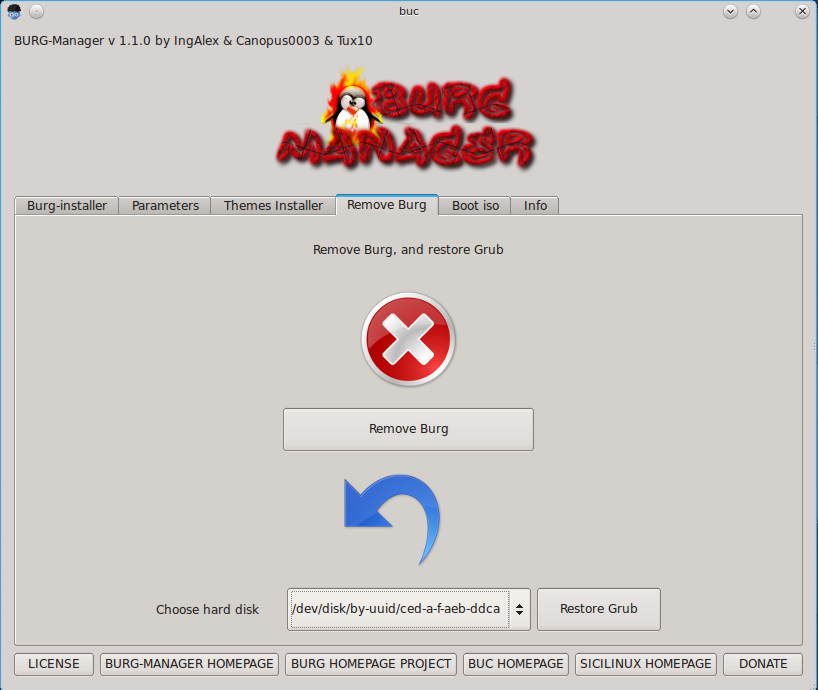
If for some reason you need to remove BURG and install GRUB, BURG-Manager has you covered. As much as I like BURG-Manager for all its features, I wish somebody would give the interface some face lift.