
Issues you should be aware of – If you’ve been thinking about distro-hopping to PC-BSD, here are a few issues you should be ware of:
- The number of binary packages available for installation is nowhere near what you’ll find on any Linux distribution. What that means is that for some applications, installation from source could be your only option. That takes time.
- The first time I left the test PC unattended for some time, I was unceremoniously logged out. This is when the screen saver should have been activated, but instead, the system just kicked me out. The second time I left it unattended, the system just froze. Rebooting was my only option.
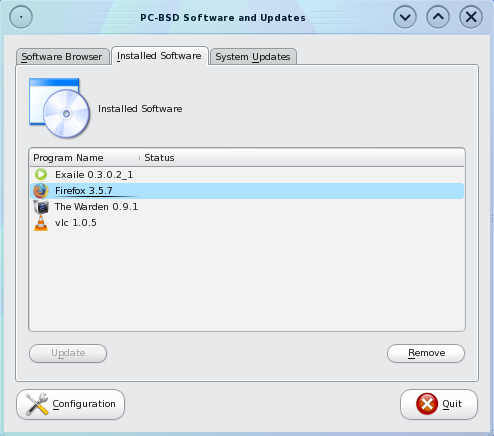
- The third issue has to do with pbiDIR, and I’ll illustrate with the following screenshots. Look closely at the first screenshot. Notice that the highlighted line indicates that Firefox 3.5.7 is installed. Now to the second screenshot
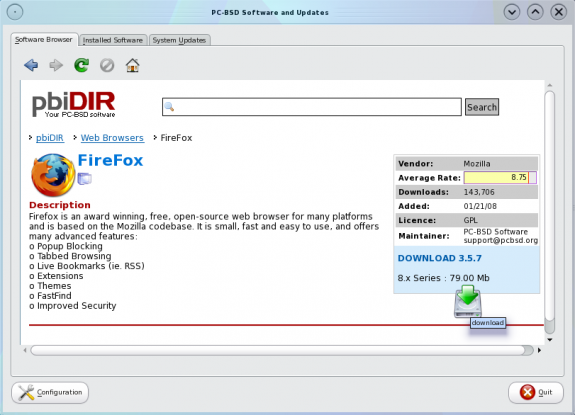
Here I’m attempting to install Firefox, the same version that the system shows it already installed. Now see what happens when I click to install it again.
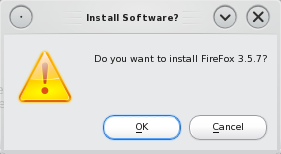
There’s no need to re-install the same version of Firefox. Ideally, the prompt should read, “Do you want to install Firefox 3.5.7? (Will replace existing version).” But in this case, it doesn’t. Now see what happens when I click “Ok.”
This screenshot shows the system installing the same version of Firefox that’s already installed. Note that this behavior is not consistent. I’ll illustrate this inconsistency with one last screenshot, after the one below.
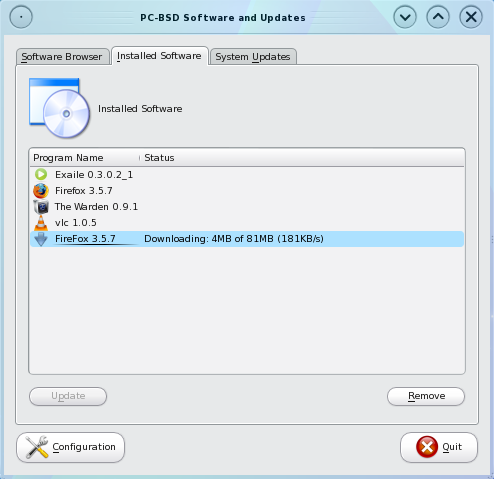
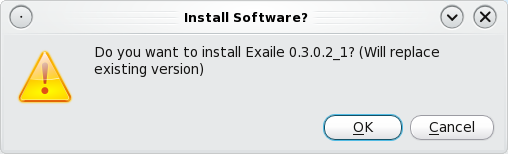
This screenshot illustrates the expected behavior. The system clearly shows that it is aware that Exaile is already installed.
- While some bugs are specific to PC-BSD 8, others seem to be related to KDE, the desktop environment. For example, trying to configure Network Time Protocol from the graphical utility never succeeds.
These are just a few of the problems I encountered with this distribution. There are several more. Though I like PC-BSD as a desktop distribution, it is still very buggy, still very rough around the edges for a newbie. I certainly will not recommend that you dump your Linux distro for PC-BSD 8. Note that I am not saying that Linux is better than *BSD, but that as a desktop distribution, PC-BSD 8 is not yet in a position to compete with the best Linux, desktop distributions. Before you launch your keyboard-propelled grenades, re-read this paragraph.
Ok, so I’ve told you about aspects of the “dark side” of PC-BSD 8. Let’s take a peak into the bright side. Let me clue you in to some of it’s best features, features that power users will just love. One of those features is ZFS, the file system that the Linux community wish they had. Here’s a geek’s head description of ZFS, the “future-proof file system,” from the official site:
Solaris ZFS offers a dramatic advance in data management with an innovative approach to data integrity, tremendous performance improvements, and a welcome integration of file system and volume management capabilities. The centerpiece of this new architecture is the concept of the virtual storage pool which de-couples the file system from physical storage in the same way that virtual memory abstracts the address space from physical memory; allowing for much more efficient use of the storage devices. In ZFS, space is shared dynamically between multiple file systems from a single storage pool, and is parceled out from the pool as file systems request it. So, physical storage can be added to or removed from storage pools dynamically, without interrupting services. This provides new levels of flexibility, availability, and performance. And in terms of scalability, Solaris ZFS is a 128-bit file system. Its theoretical limits are truly mind-boggling—2128 bytes of storage and 264 for everything else, such as file systems, snapshots, directory entries, and devices.
Another nice feature is Packet Filter (PF), the firewall application. If you ever need to, writing PF rules will be one of the easiest tasks you’ll ever undertake on a UNIX-like operating system. It is a whole lot easier than messing with IPTables/Netfilter. If you’ve never used PC-BSD/FreeBSD, one more feature I’ll like to bring to your attention is The Warden. The Warden is a graphical/command line utility for managing Jails. On a FreeBSD-based system, the Jail, an enhanced chroot implementation, makes it possible to install applications within an environment securely isolated from the host system. The Warden takes the hassle out of creating and managing Jails and installing applications in Jails. There are similar technologies on Linux, but I’ve not come across an application like the Warden on a Linux, desktop distribution.
Resources – Home page. Installation images for all supported platforms are available for download here.



You said: “Encryption of the root partition is not supported. While it is possible to specify the encryption of the other partitions, the implementation does not provide the protection that disk encryption is expected to. Fedora has a better implementation of disk encryption than this or any other distribution.”
This is a very dumb thing to say for the following reasons:
1) Slackware was the first real distribution to be able to encrypt its root partition (starting with 12.0 released June 2007) and this was documented BY Slackware and released as a README_CRYPT.TXT on the official install media. The first time Fedora was able to be installed this way that I see on Google is Fedora 8, November 2007.
2) Such a setup on Slackware Linux is extremely easy (just manually create LUKS+LVM, tell setup to install to it, make an initrd, and reboot) and much less risky (seriously, on Fedora 8 you install somewhere else and then forcefully raw-copy the data into the container setup? Data integrity alarm bells should be making you deaf by now). LUKS+LVM is officially supported by Slackware Linux since this time, and by the installer basically. To my knowledge I have yet to see any other Linux distribution that understands and can install to a fully encrypted setup like this (much less, my next point is….)
3) When you can reveal to me what information someone can obtain from an unencrypted root partition (assuming swap and /home are encrypted), let me know. Unless they can get access to the unfiltered memory on the machine (and/or cold-boot the memory but I highly doubt you’re ever going to have anyone that good pursuing your information) there is no other place to get the encryption key you supply with LUKS. The only other way to get at the data is the “angry maid” attack (which applies to both luks+lvm and any simpler setup with an initrd). At most you’re only making life a minute harder for a would-be attacker (because copies of Live Linux CDs are freely downloaded).
4) The L in LUKS stands for LINUX. They may have the necessary software by now, but they’re not Linux so why are you pestering them? I don’t see Mac or Windows being able to do this in the software level (i.e. encrypted root) so your argument is empty.
So to summarize, Slackware had it first, Slackware officially supported it first, encrypting the root partition is 99% irrelevant to security assuming you take other smart steps, and you’re unwise to rip on BSD about something that was created for Linux (LUKS and LVM).
Since I’ve never reviewed Slackware, I’ll take your word for it that “Slackware was the first real distribution to be able to encrypt its root partition.” This, of course, implies that there are non-real distributions that had the feature before Slackware 😉
Your second point leads me to believe that you have not used Fedora since Fedora 8. If you did, you’d know that all it takes to configure encrypted LVM on Fedora is one mouse click. Nothing more. Beats manually creating LUKS+LVM, initrd, and other “extremely easy” stuff. There is a short tutorial about it here.
On point 3, I am not in a position to reveal to you “what information someone can obtain from an unencrypted root partition,” but that does not been they can not. Your point here implies that encrypting root is not necessary, that encrypting Swap and /home is all that is needed. I find that hard to believe. If that had ended with the implied statement, I’d have cut you some slack, but to explicitly state that “encrypting the root partition is 99% irrelevant to security” makes my head spin. It’s still spinning. In a very bad way, that statement is funny.
Before you start defending this statement, consider this opening paragraph from the disk encryption chapter of the FreeBSD Handbook:
Disk encryption is ineffective if an unauthorized party with physical access to your computer can boot it. The point of disk encryption is to deny access to data stored on your computer to people who do not have a right to read it. And there is no better way to enforce that than to make it impossible for them to boot the computer completely. Most distributions do not put /home on a separate partition, so encrypting your home directory wont do you much good.
Who had it first is not as important as who is doing it right. Btw, my suggestion to the PC-BSD development team (I’m subscribed to their testing mailing list) led to a change in the manner that disk encryption is configured. Grab a snapshot ISO image here and see for yourself.
It’s obvious that you have not kept up with the times. Many distributions do not create a separate partition for /home, so stating that “encrypting the root partition is 99% irrelevant to security” is implying that disk encryption plays no meaningful role in the security posture of a system.
In PC-BSD, for example, the default partitioning scheme has /home in a jail under /usr, with /usr on a separate partition. Ubuntu and the bevy of distributions based or derived from it place /home under the same partition as /, with the option to encrypt a user’s home directory. And depending on the size of a hard disk, Fedora and other distributions that use Anaconda follow the same script. So you can imagine what not encrypting root in these situations amount to.
But will this version recognize my wireless NIC, TP-LINK TLWN353G/TL ?? pcBSD7 does not, and nowhere can I find a driver or installation protocol that works. Has anyone overcome this problem with pcBSD 7 or 8?
Thanks
Simon
I think your comment is a bit late for PC-BSD 8. Have you tried PC-BSD 8.1?
I am currenly installing 8.1 on my laptop. It has I7 with 6gb ram. Install was slow but painless. It still felt a tad sluggish for such a high end machine (vaio F series) with so much ram and such a decent processor.
Setup is clean, easy to configure, nothing was too hard even for a beginner like myself. I was up and running the internet with firefox skyping with friends in 30 or 40 minutes after I stuck the CD in and booted.
I look forward to updates. Note it had trouble with my atheros wireless card and nvidia 330m.
I am in the process of reviewing 8.1. Have you tried to install on a zfs file system?
Like others on here, I was excited to get my hands on another PC-BSD release. However, I don’t know if it’s BSD’s KDE or if it’s something with the nvidia drivers, but the system was really slow. For example, going through subcategories in the KDE menu created a noticeable stutter. The system takes a considerable amount of time to start-up and just using standard KDE applications makes the system feel sluggish. So unfortunately, PC-BSD didn’t live up to my expectations. Personally, I think it’s a KDE issue because when PC-BSD used KDE 3.5, it was always responsive.
Nice look, but slow and buggy. I’ve installed PC-BSD v8 a total of 3 times on the same machine, and each time, the root password gets corrupted. I can not su and do anything that requires administrative privileges. Going back to 7.1.1. Looking forward to 8.1.
Just tried it again after a re-download/md5 check, & an eon-long install (on my other machine).
Some of the installed applications wouldn’t work, e.g. music/cd player/VLC, etc.
SO, I’m erasing the ‘pissy beastie’ & installing Haiku R1/Alpha, which looks promising & interesting, & doesn’t make false claims!
At least I CAN depend on (hacked) XP with FOSS on this machine!
I really looked forward to this release & tested it, only to find I can’t install my mobile broadband ‘dongle’! (Same goes for OpenSolaris, & Pardus, by the way)
I also found PC-BSD 8.0 was slow, REALLY slow, like Vista is fast to boot-up in comparison!
Anyone remember the problems with the Hubble deep-space telescope when it was first ‘booted-up’? I’m sure the problems with 8.0 will be resolved, but, aren’t these things supposed to be sorted in a ‘stable’ release version?
It would be really nice to live in a world without windows, gates or bills!
Something must be wrong in PC-BSD 8 x64 release or KDE: there never was OS installed of such ill responsiveness on that machine ever. Try to play simple thing as Tetris, and you cannot enjoy because of constantly struggling response, and that’s not because of being picky – shouldn’t be that bad, cause should be hunted and fixed. It is AMD64 2800+ system with 1GB RAM, that is pretty well running either x86 or x64 code.
Otherwise, installation went well, once big enough partition was given (upgrade of former FreeBSD instance was not successful probably because of that). Also, OS appearance is attractive and rational. Packages of Skype, Java RE, Opera installed and integrated smoothly. Good job, that needs very little fixing to enjoy it in full extent possible.
Lots of issues with PC-BSD 8, a release that in my opinion should have been a beta release. Hope they fix all the issues in 8.1
Are you sure it’s even worthy of ‘beta’ status? ReactOS 0.3.11 is ‘alpha’ & works better, in my experience!
I really liked PC-BSD 8, it looked good, installed well, was able to use my ATI 3d card( Which has always been a problem for some reason, check the forums), but installing stuff did throw up the issues you spoke about. Using PBIDir was inconsistent again. So much so that unless you’re a diehard PC-BSD fan you’ll go back to the other *BSD’s instead. I have to say though, that if they get their act together, and just hold off releasing a flawed OS, then they’ll certainly do well.
The problem with going back to “the other *BSD’s” is that there is no other desktop BSD to go back to. PC-BSD is the only usable desktop BSD that we have, but it is no yet ready for prime time. Like you said, this was a flawed release.
finid-
I strongly agree with the limited *BSD options available as a “true” desktop, however, like Gentoo Linux, if take the time to create a desktop properly once, all you have will be updates (not a :20 minute install like Ubuntu or Debian [I love Debian – no disrespect meant here], but at least a progressive day or so). Whilest on this subject, I would like to mention DesktopBSD, which I thought was MUCH better than the PC-BSD project. DesktopBSD was FreeBSD with a front-end that worked flawlessly and when that project collapsed (with what I assumed was because of too much attention being paid to the PC-BSD group), I was floored. It ran great on both x86 and x64 machines (I ran it on both), worked wonderfully with ports/portsnap, and had a hardware recognition system unparalleled by any current BSD out there. As a community, IMHO, we shot ourselves in the foot by letting this flavor slip away………I would return to using it, but the promise of updates is apparently lacking. My appreciation does, however, go out to developers and support team that made it an awesome addition to available desktops out there (AND IT WASN’T BASED (in any way) ON UBUNTU!!!!! – Canonical is a cancer to the Linux community).
As far as I know, DesktopBSD is dead. I’m keeping an eye on DragonFlyBSD. It’s another promising distro, trying to do things it’s won way. As far as Canonical being “a cancer to the Linux community,” I concur. M. Shuttleworth is an opportunist. He’s does not really care about the Free Software community.
-finid
DesktopBSD may not be completely dead. I still run it upgraded to 7.3 which is supported for a couple of years. There are people on the forums who want to resurect/fork it. It was and still is far superior to PC-BSD and you can just keep it updated by the traditional FreeBSD methods. keep an eye out for http://www.smartbsd.org
I think the new look is great, but unfortunately, that’s where the excitement ended for me. Slow and unresponsive. PBIs failed to work so I went to use ports and I had a blow-up of a proportion that made me stop any further use of PC-BSD, now and probably for a long time to come. Quick reinstall of FreeBSD 7.3, updated a few apps, and I’m home again. PC-BSD looks great, but eye candy really = bloat which usually results in a great looking system that suffers from extremely poor performance.
It should never have been released. Just too many unresolved issues.
I tested out this version myself. I had issues using zfs for my root file system… but otherwise things went smoothly. its interesting to note that i was unable to install the freebsd 8 (using their media) on the same machine due to lack of drivers.
i really enjoyed the KDE from pcbsd. i normally use gnome but have lately tried two other OSes with kde4 out of the box; linux mint kde and kubuntu…. both were extremely buggy with the interface and apps crashing all the time.
i also forgot to mention re zfs… the current freebsd installer can’t handle zfs… so pcbsd is a great choice if you want an easy way to jump head first into zfs.
The way the installer handles partitioning is not very optimal if you want to use ZFS.
The problems with playing CDs Kscd are well documented as is with amarok its all down to bad coding from KDE. The latest KDE4.4 nearly solves it but both players still crash at will. I personally think PCBSD really tries to bring BSD to the public and every version improves on the last. The pbi system for software is a good idea as programs are not dependent on each other. PCBSD is closing the gap with Linux at a very fast rate.